
Google Ad Manager 360
Use GrowthLoop audiences for Google Ad Manager 360 audience segments.
Connect this destination to export audience membership as an Ad Manager audience segment, for use in Google Ad Manager 360.
This destination writes to your Google Ad Manager 360 account and is a good fit when you want to:
- Send a publisher provided identifier or a device identifier
- Make GrowthLoop audiences available as an Ad Manager audience segment
This maps to GrowthLoop Audiences:
| Use it for | Audiences |
|---|---|
| Sending GrowthLoop audiences to Google Ad Manager 360 audience segments | ✓ |
If you only need a generic GCS file drop, use Google Cloud Storage.
Prerequisites
Make sure you have:
- Your Google account manager to enable audience lists via GCS for your network, provide a public GCS bucket, and configure a Google Group for that bucket. The bucket URI uses this format:
console.developers.google.com/storage/browser/gdfp_cookieupload_[Ad Manager network code]. - Your Network code from Ad Manager Admin → Global settings → Network code.
- A Google Cloud Storage service account whose JSON key you can paste into GrowthLoop. See Google Cloud Storage to create the service account. Add that service account to the Google Group with write access to the public bucket.
- GrowthLoop's service account,
[email protected], added as a user on your GAM 360 network, with API access enabled and permission to View and Edit Audience Segments. See Google's Ad Manager API authentication.
NoteYou only need the GrowthLoop service account on your network if GrowthLoop should create a new audience segment during export. To add users to an existing segment, enter that segment ID when you export. To create a segment yourself, see Google's audience segment help.
Set up Google Ad Manager 360 as a destination
- In GrowthLoop, click the Destinations tab on the left sidebar.
- Click New Destination in the upper right corner.
- Search for GAM and click Add GAM360.
- Enter the required information, then click Create.
| Field | Description |
|---|---|
| Destination Name | Name this destination in GrowthLoop. Use a name so your team recognizes its purpose, like "Google Ad Manager 360". |
| Sync Frequency | Set the default export frequency (for example, daily or weekly). You can override this setting for individual exports. |
| Bucket | The public GCS bucket name in this format: gdfpcookieupload[Ad Manager network code]. |
| Credentials | The entire contents of your service account JSON key file. |
| Network Code | Your Ad Manager network code from Admin → Global settings → Network code. |
GrowthLoop validates the connection. GAM360 then appears in your list of connected destinations.
Export to Google Ad Manager 360
From within GrowthLoop, export from an audience. See Export an audience if you need more information on these steps.
After building or selecting an audience, click Export, then search for GAM360.
Map identifiers
Map one identifier.
| Match field | Description |
|---|---|
| Raw Publisher Provided Identifiers (PPID) | Publisher provided identifiers. See Google's PPID help |
| Raw Identifier for Advertising (IDFA) | iOS advertising identifier |
| Raw Android TV Identifiers (ADID) | Android TV advertising identifier |
| Raw Roku Identifiers (RIDA) | Roku advertising identifier |
| Raw Apple TV Identifiers (TVOS) | Apple TV advertising identifier |
| Raw Vizio Identifiers (VIDA) | Vizio advertising identifier |
| Raw Samsung Identifiers (TIFA) | Samsung advertising identifier |
GrowthLoop checks whether values are already SHA-256 hashed (64-character hexadecimal). If they are not, GrowthLoop hashes them before sending them to GAM 360.
GrowthLoop supports array columns as match fields. If the column contains an array of identifiers, GrowthLoop expands the array and sends each value.
Configure the export
| Setting | Audience export |
|---|---|
| Export Name | Defaults to the audience name. |
| Campaign type | Choose a one-time or ongoing export. |
| Export Inclusion Criteria | All audience members or Newly added audience members since the last export. |
| Audience Segment ID | New creates a segment named after the audience and adds users. Existing adds users to a segment you identify with its GAM 360 ID. |
| Schedule | Set frequency, start date, end date, and days of the week for ongoing exports. |
When GrowthLoop creates a new segment, it appears in Ad Manager as <audience_name>_GL_Audience_<audience_id>.
Export behavior
This is what GrowthLoop writes when you export an audience.
| Behavior | What happens |
|---|---|
| What GrowthLoop writes | An audience list file to the GCS bucket Google provisioned, then an Ad Manager audience segment. Direction is GrowthLoop → GCS → GAM 360. |
| When it runs | GrowthLoop sends the export as a batch on the next successful run. An export that starts Now runs within about 15 minutes. Allow up to 24 hours after segment creation before the batch upload is available in Ad Manager. |
| Match field | One publisher or device identifier. Unhashed values are SHA-256 hashed before send. |
| New segment | GrowthLoop creates a segment and adds users. Requires the GrowthLoop service account on your network. |
| Existing segment | GrowthLoop adds users to the segment ID you enter. It does not create a new segment. |
| One-time exports | GrowthLoop sends current membership once, or only newly added members if you chose that inclusion setting. |
| Ongoing exports | GrowthLoop exports new audience members as they qualify. |
Confirm the export was successful
When the run finishes, confirm you can use the data in Google Ad Manager 360.
- Audience export: Look up the
gdfp_cookie_upload_<network_code>_<timestamp>.csvfolder in your GCS bucket, then look up the segment in Ad Manager. New segments use the<audience_name>_GL_Audience_<audience_id>name.
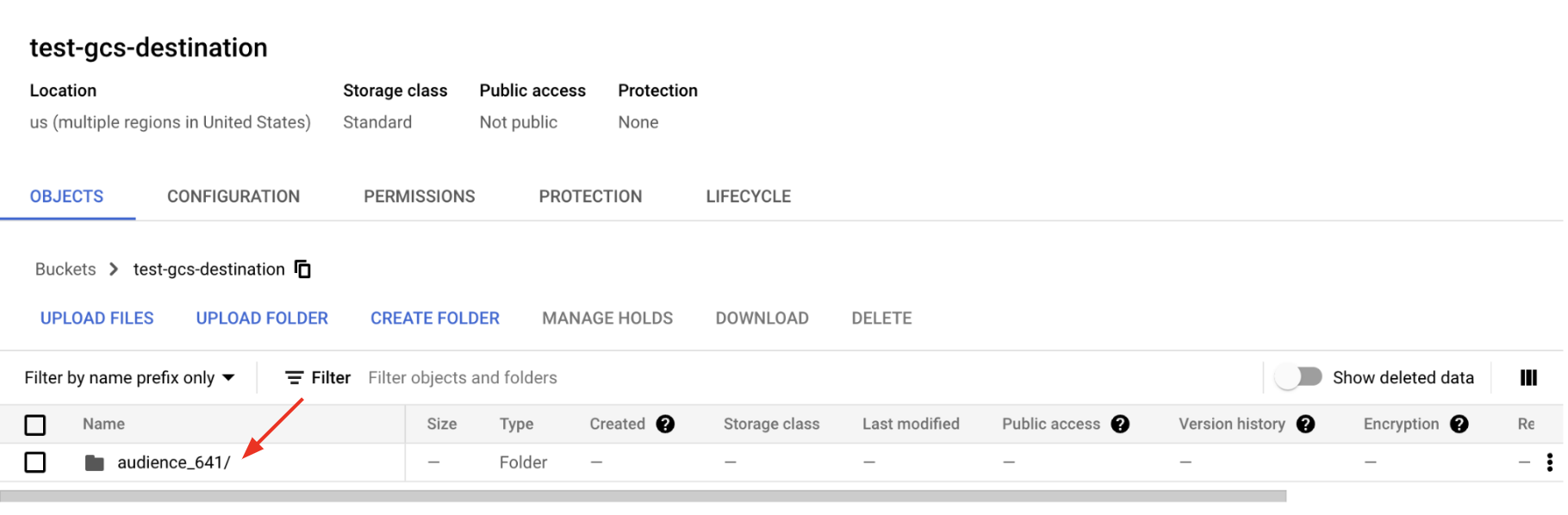
In GrowthLoop, review counts on the audience Exports tab. See Export an audience for more information.
Congrats on successfully exporting to Google Ad Manager 360!
Troubleshooting
These are the issues we see most often. You can always email us at [email protected] for help.
| Problem | Cause | Resolution |
|---|---|---|
| Connection fails to validate | The bucket name, JSON key, or Network Code is wrong | Use gdfpcookieupload[Ad Manager network code], paste the full JSON key, and copy Network Code from Admin → Global settings |
| A new segment fails to create | The GrowthLoop service account is missing, or it cannot view and edit audience segments | Add [email protected] with View and Edit Audience Segments, or export to an Existing segment ID |
| Rows fail to match | No identifier is mapped | Map PPID or a device identifier from the table above |
| The list is in GCS but not in Ad Manager | Batch upload can take up to 24 hours | Confirm the gdfp_cookie_upload_<network_code>_<timestamp>.csv folder, then wait up to 24 hours and refresh Ad Manager |
| Users are not added to an existing segment | Audience Segment ID is New, or the existing ID is wrong | Select Existing and enter the GAM 360 segment ID |
Updated about 1 month ago