
Audience Discovery
Review audience suggestions that AI Studio surfaces from your GrowthLoop audience metadata.
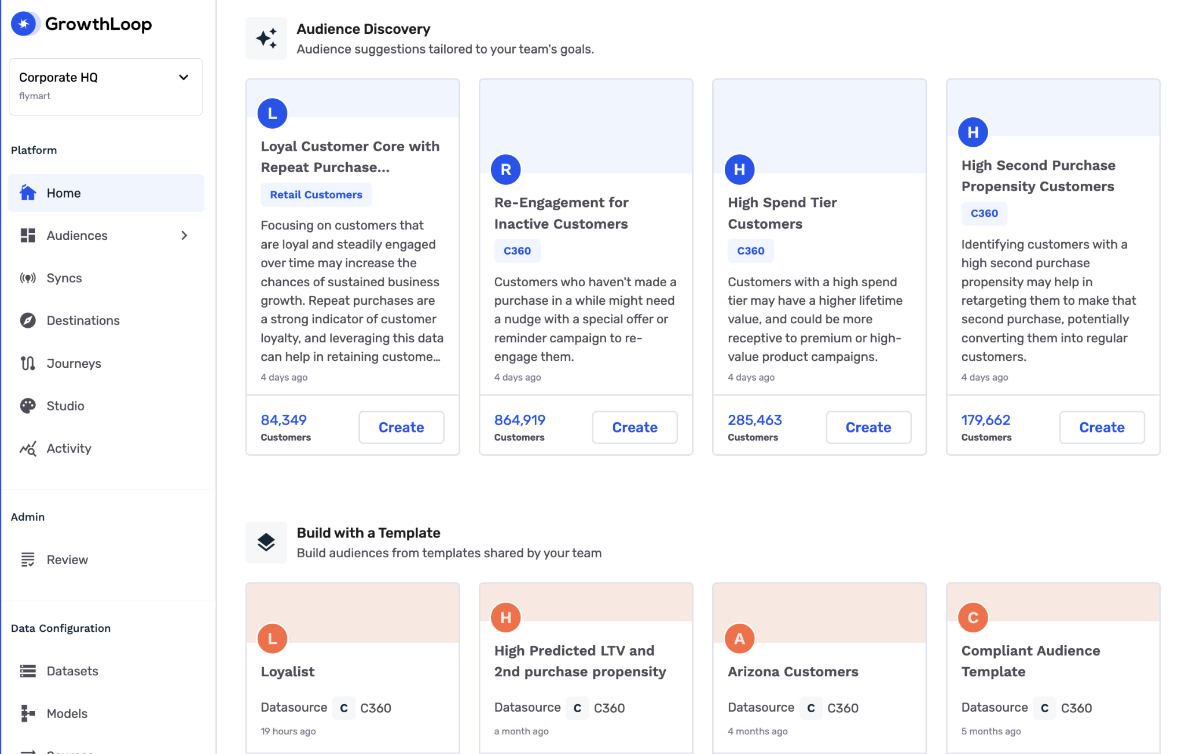
Audience Discovery shows suggested audiences on Home. Use a suggestion to open an audience draft, then review the logic in the audience builder.
Prerequisites
Before you start:
- Set up AI Studio for the Dataset Group you want suggestions to use.
- Confirm that Audience Discovery is included for your organization.
- Create and export audiences in GrowthLoop so Audience Discovery has audience metadata to use.
Contact [email protected] if you do not see Audience Discovery.
How it works
Audience Discovery uses GrowthLoop metadata, such as audience names, descriptions, filters, dataset names, field names, and field descriptions. It does not train on individual customer rows.
Suggestions appear on Home when they are available. Each suggestion includes enough context to decide whether it is worth reviewing.
Review a suggestion
- Click Home in the left sidebar.
- Scroll to Audience Discovery.
- Review the suggested audiences.
- Click Create on a suggestion you want to use.
- Review the generated audience in the audience builder.
- Edit filters, exclusions, or names as needed.
- Save and export the audience when it matches your campaign goal.
Improve suggestions
Audience Discovery depends on clear GrowthLoop metadata.
- Use descriptive audience names.
- Add audience descriptions that explain the campaign goal.
- Keep dataset and field descriptions current.
- Add business definitions in Context Manager.
- Remove or archive audiences that should not influence future recommendations.
NoteAlways review audience logic and size before activation.
Next, review AI Studio best practices for prompts, context, and review habits.
Updated 3 months ago