
Match Rules
Learn how match rules identify records that belong to the same person.
Match rules are the heart of Identity Resolution. They define which field combinations identify records as belonging to the same person. In this article, we'll explore how matching works and strategies for effective rule design.
How Matching Works
Identity Resolution uses a cascading match approach:
- All records from all sources are collected
- Rule 1 is applied—records that match are grouped together
- Remaining (unmatched) records move to Rule 2
- This continues through all rules
- Records that don't match any rule remain as separate identities

NoteOnce a record matches a rule, it stops processing. This is why rule order matters—place your highest-confidence rules first.
Anatomy of a Match Rule
Each match rule specifies:
| Component | Description |
|---|---|
| Rule Number | The order in which this rule is evaluated (1, 2, 3...) |
| PII Fields | The fields that must match for records to be grouped |
For example, a rule using Email + First Name + Last Name means: "Group records together if they share the same email AND first name AND last name."
Designing Effective Rules
Start Strict, Then Broaden
Your first rule should be your most confident match:
| Rule | Fields | Confidence |
|---|---|---|
| 1 | Email + First Name + Last Name | Highest |
| 2 | Phone + First Name + Last Name | High |
| 3 | First Name + Last Name + Postal | Medium |
| 4 | Email only | Lower |
This approach ensures:
- High-confidence matches happen first
- Broader rules only catch what stricter rules missed
- You minimize false positives (incorrectly merging different people)
Choose Fields Wisely
Different fields have different matching characteristics:
| Field | Uniqueness | Data Quality | Notes |
|---|---|---|---|
| High | Usually good | Best single identifier, but people have multiple emails | |
| Phone | High | Variable | Formatting differences can cause misses |
| First + Last Name | Low alone | Good | Common names cause false positives; combine with other fields |
| Postal Code | Low | Good | Too broad alone; useful as a supporting field |
| Address | Medium | Variable | Formatting variations can cause misses |
Understanding Match Results
After running Identity Resolution, the Summary tab shows how your rules performed.
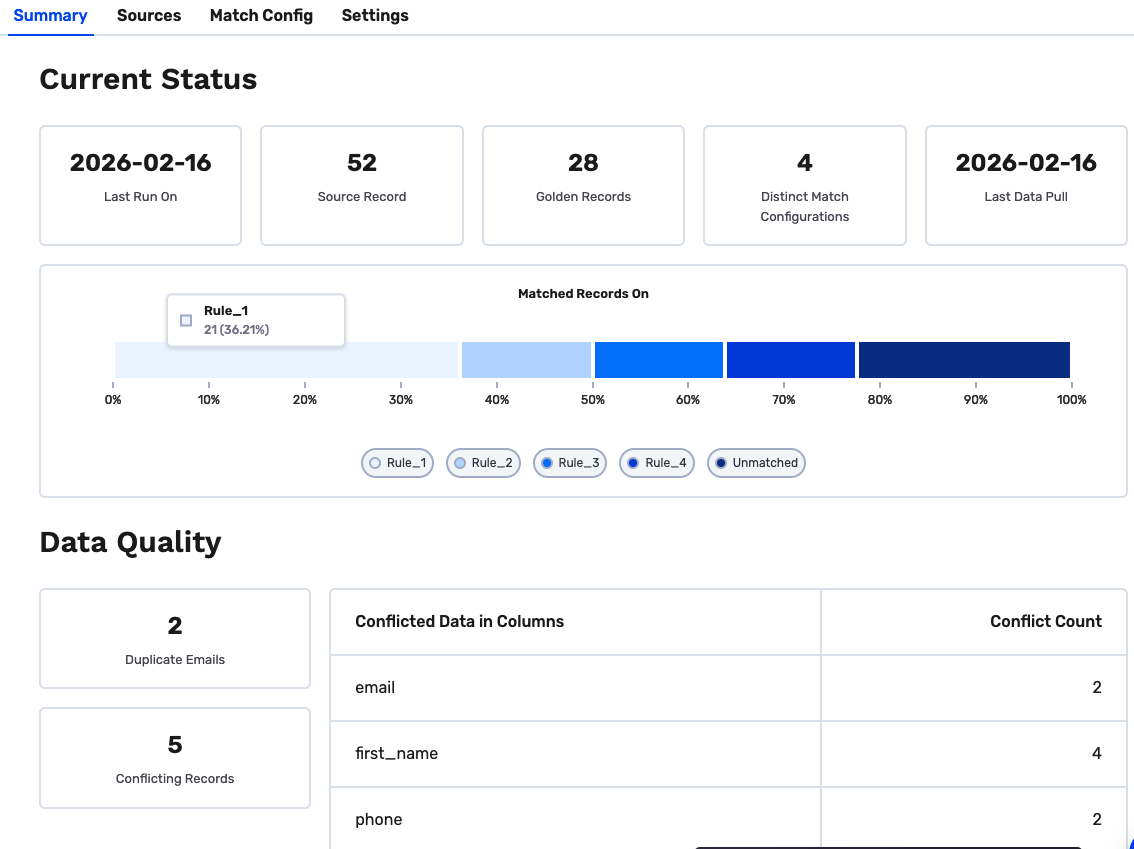
Current Status
| Metric | Description |
|---|---|
| Source Records | Total records processed across all source tables |
| Golden Records | Number of unified profiles created |
| Distinct Match Configurations | Number of match rules applied |
Matched Records On
The bar chart shows how records matched across your rules:
- Each rule displays its count and percentage (e.g., Rule_1: 21 records, 36.21%)
- Unmatched records didn't match any rule and remain as individual profiles
- Colors help visualize the distribution across rules
Data Quality
This section highlights potential issues in your data:
| Metric | What It Means |
|---|---|
| Duplicate Emails | Records with the same email found across sources |
| Conflicting Records | Records where sources have different values for the same field |
The Conflicted Data in Columns table shows which fields have conflicts and how many — useful for identifying data quality issues upstream.
Interpreting Your Results
- High Rule 1 matches — Your strictest rule is effective
- Many unmatched records — Consider adding broader rules
- High conflict counts — Review source data quality or adjust precedence
Troubleshooting
Too Many Unmatched Records
If most records aren't matching:
- Check PII coverage — Do your sources actually share common fields?
- Review data quality — Are there formatting differences (e.g., "[email protected]" vs "[email protected]")?
- Add broader rules — Consider rules with fewer required fields
NoteIdentity Resolution normalizes common variations (case, whitespace), but significant formatting differences may need data cleaning upstream.
Suspicious Merges
If unrelated people are being merged:
- Tighten rules — Add more required fields
- Check for data issues — Placeholder values like "[email protected]" can cause false matches
- Review source precedence — Ensure high-quality sources are prioritized
Missing Expected Matches
If records you know belong together aren't matching:
- Verify field mapping — Are the PII fields mapped correctly?
- Check for nulls — Records with null values in match fields won't match
- Review rule coverage — Do your rules cover this combination of fields?
Ready to understand your results? Continue to Output Tables to learn about the Final Identity Table and other outputs.
Updated 8 months ago