
Warehouse Query Labels
Track and monitor GrowthLoop's warehouse usage with query labels
GrowthLoop labels every query it runs in your data warehouse so you can track cost, usage, and provenance directly from your warehouse's query history. This works out of the box — no configuration needed.
Query labels let you answer questions like:
- How much warehouse spend is GrowthLoop responsible for?
- Which teams or users are driving the most usage?
- What is the cost of a specific audience or journey?
Supported Warehouses
Query labels are supported on BigQuery and Snowflake. The labels are applied automatically to every query GrowthLoop runs.
| Warehouse | Mechanism | Where to Query |
|---|---|---|
| BigQuery | Job labels | INFORMATION_SCHEMA.JOBS |
| Snowflake | QUERY_TAG session parameter (JSON) | SNOWFLAKE.ACCOUNT_USAGE.QUERY_HISTORY |
Available Labels
Every query includes the following labels. All GrowthLoop queries are identified by application = "growthloop".
| Label | Description |
|---|---|
| application | Always growthloop |
| product | Area of the application that generated the query (see below) |
| team-id | Numeric team ID |
| user-id | Numeric user ID |
| organization-id | Organization identifier |
| dataset-group-id | Numeric dataset group ID |
| dataset-id | Numeric ID of the primary dataset |
| audience-id | Numeric audience ID |
| journey-uuid | UUID of the journey |
| journey-id | Numeric journey ID |
| tags | In-app labels applied to the audience or journey |
Not every label is present on every query. For example, audience-id will only be set on queries that are associated with a specific audience.
Product Values
The product label indicates which part of GrowthLoop generated the query.
| Product | Description |
|---|---|
| audience-builder | Queries generated in the audience builder (previews, counts, etc.) |
| audience-snapshotting | Queries generated during audience exports to destinations |
| journeys | Queries generated by journey execution |
| models | Queries run manually by a user in the Models page |
Finding IDs in the App
Most of the label values correspond to numeric IDs that are visible in the GrowthLoop application. Here's where to find them:
Team IDs
Navigate to Organization → Teams tab. The numeric Id column shows the team ID for each team.
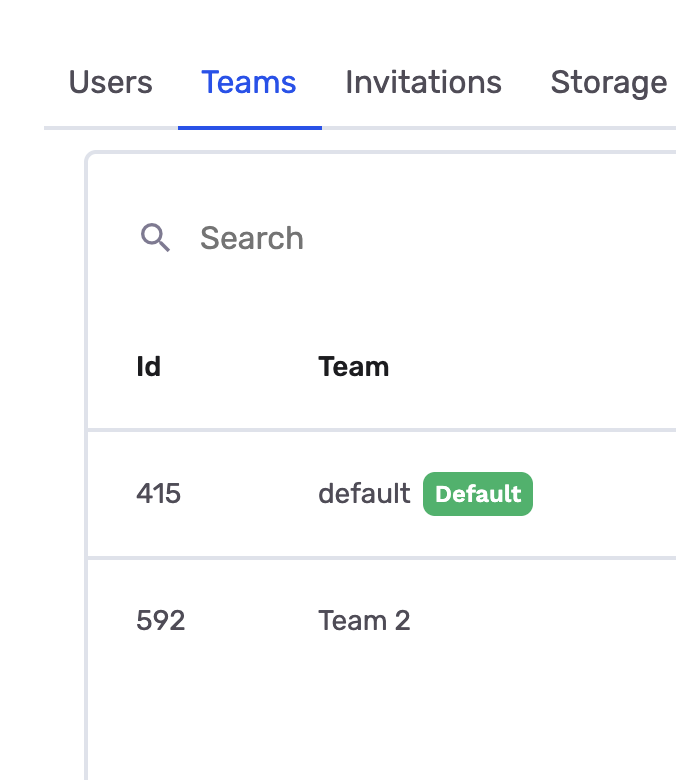
In this example, the "default" team has ID 415 and "Team 2" has ID 592. Use these IDs when filtering warehouse queries by team.
User IDs
Navigate to Organization → Users tab. The numeric Id column shows the user ID for each user.
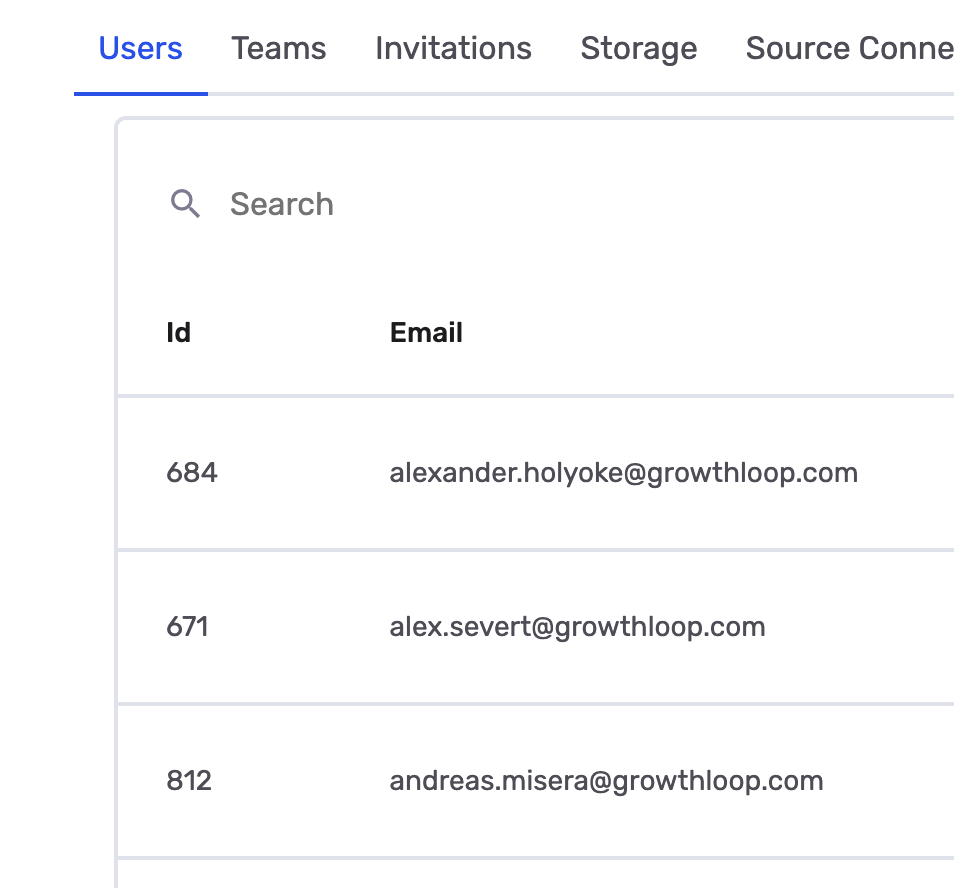
Each user in your organization has a unique numeric ID. Use these to track warehouse usage by individual users.
Audience IDs
On the Audiences page, the leftmost Id column displays the numeric audience ID.
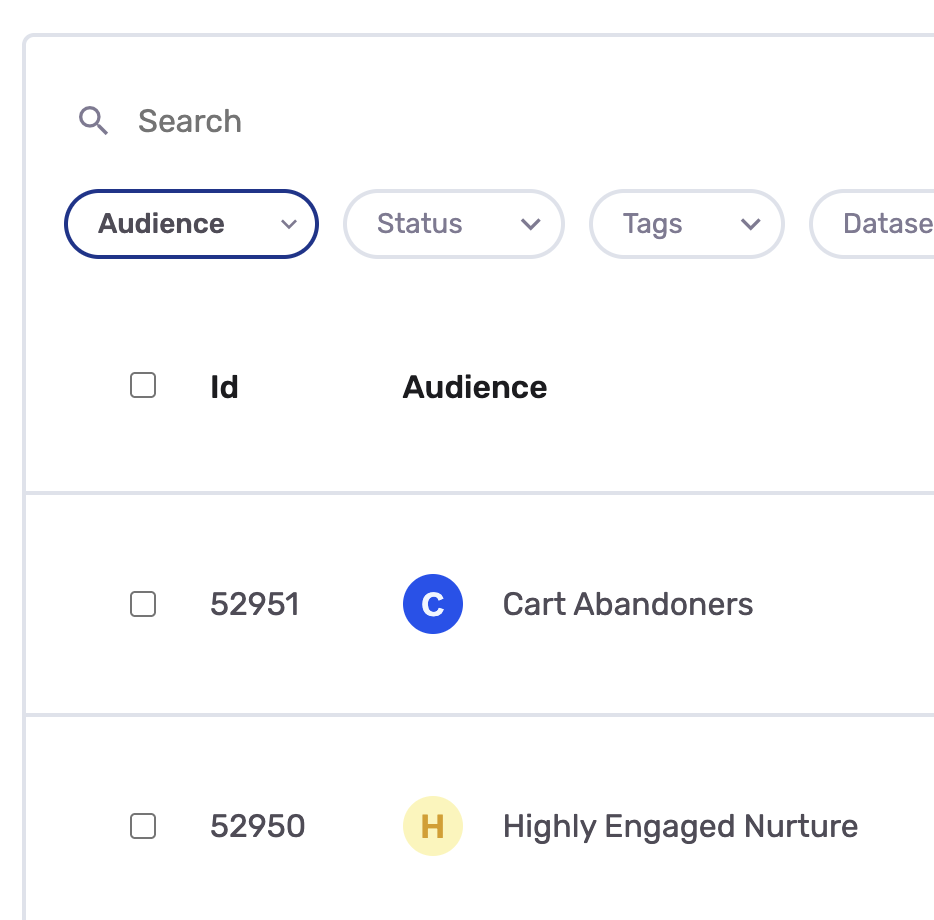
Audience IDs are also visible in the URL when viewing an audience detail page (e.g., /audiences/52951).
Tags
Tags are custom labels you apply to audiences and journeys in the app. You can view and filter by tags on the Audiences page using the Tags dropdown.
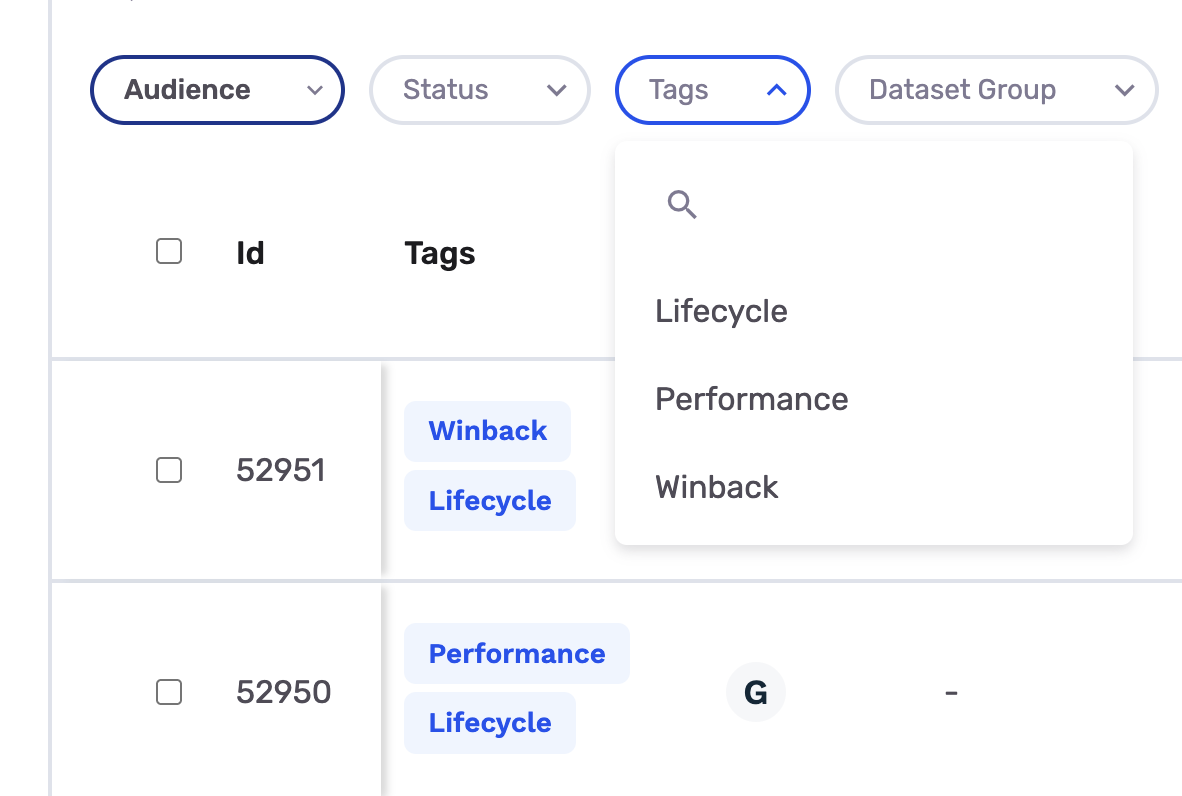
When you apply tags like "Lifecycle", "Performance", or "Winback" to your audiences, these values are included in the tags label as a comma-separated string. Use this to group warehouse costs by business function or campaign type.
Other IDs
- Dataset Group IDs are visible in the dataset group detail view URL (e.g.,
/dataset-groups/123). - Organization IDs are your organization's unique identifier and can be found in the Organization settings page.
BigQuery
In BigQuery, GrowthLoop attaches labels as job labels, which are key-value pairs on each query job. You can query them through INFORMATION_SCHEMA.JOBS.
Replace
region-usin the examples below with the region of your BigQuery dataset (e.g.,region-eu,region-us).
All GrowthLoop Queries
SELECT
  job_id,
  creation_time,
  total_bytes_billed,
  total_slot_ms / (1000 * 60 * 60) AS slot_hours,
  (SELECT value FROM UNNEST(labels) WHERE key = 'product') AS product,
  (SELECT value FROM UNNEST(labels) WHERE key = 'team-id') AS team_id,
  (SELECT value FROM UNNEST(labels) WHERE key = 'user-id') AS user_id,
  (SELECT value FROM UNNEST(labels) WHERE key = 'audience-id') AS audience_id
FROM `region-us`.INFORMATION_SCHEMA.JOBS
WHERE creation_time >= TIMESTAMP_SUB(CURRENT_TIMESTAMP(), INTERVAL 7 DAY)
  AND (SELECT value FROM UNNEST(labels) WHERE key = 'application') = 'growthloop'
ORDER BY creation_time DESC
Usage by Team
SELECT
  (SELECT value FROM UNNEST(labels) WHERE key = 'team-id') AS team_id,
  (SELECT value FROM UNNEST(labels) WHERE key = 'product') AS product,
  COUNT(*) AS num_queries,
  SUM(total_bytes_billed) AS total_bytes_billed,
  SUM(total_slot_ms) / (1000 * 60 * 60) AS slot_hours
FROM `region-us`.INFORMATION_SCHEMA.JOBS
WHERE creation_time >= TIMESTAMP_SUB(CURRENT_TIMESTAMP(), INTERVAL 7 DAY)
  AND (SELECT value FROM UNNEST(labels) WHERE key = 'application') = 'growthloop'
GROUP BY team_id, product
ORDER BY team_id, product
Usage by User
SELECT
  (SELECT value FROM UNNEST(labels) WHERE key = 'user-id') AS user_id,
  (SELECT value FROM UNNEST(labels) WHERE key = 'product') AS product,
  COUNT(*) AS num_queries,
  SUM(total_bytes_billed) AS total_bytes_billed,
  SUM(total_slot_ms) / (1000 * 60 * 60) AS slot_hours
FROM `region-us`.INFORMATION_SCHEMA.JOBS
WHERE creation_time >= TIMESTAMP_SUB(CURRENT_TIMESTAMP(), INTERVAL 7 DAY)
  AND (SELECT value FROM UNNEST(labels) WHERE key = 'application') = 'growthloop'
GROUP BY user_id, product
ORDER BY user_id, product
Usage by Audience
SELECT
  (SELECT value FROM UNNEST(labels) WHERE key = 'audience-id') AS audience_id,
  COUNT(*) AS num_queries,
  SUM(total_bytes_billed) AS total_bytes_billed,
  SUM(total_slot_ms) / (1000 * 60 * 60) AS slot_hours
FROM `region-us`.INFORMATION_SCHEMA.JOBS
WHERE creation_time >= TIMESTAMP_SUB(CURRENT_TIMESTAMP(), INTERVAL 7 DAY)
  AND (SELECT value FROM UNNEST(labels) WHERE key = 'application') = 'growthloop'
GROUP BY audience_id
ORDER BY audience_id
Usage by Dataset Group
SELECT
  (SELECT value FROM UNNEST(labels) WHERE key = 'dataset-group-id') AS dataset_group_id,
  COUNT(*) AS num_queries,
  SUM(total_bytes_billed) AS total_bytes_billed,
  SUM(total_slot_ms) / (1000 * 60 * 60) AS slot_hours
FROM `region-us`.INFORMATION_SCHEMA.JOBS
WHERE creation_time >= TIMESTAMP_SUB(CURRENT_TIMESTAMP(), INTERVAL 7 DAY)
  AND (SELECT value FROM UNNEST(labels) WHERE key = 'application') = 'growthloop'
GROUP BY dataset_group_id
ORDER BY dataset_group_id
Usage by In-App Tags
Audiences and journeys can be tagged in the app. Use the tags label to monitor usage by those tags.
SELECT
  (SELECT value FROM UNNEST(labels) WHERE key = 'tags') AS tags,
  COUNT(*) AS num_queries,
  SUM(total_bytes_billed) AS total_bytes_billed,
  SUM(total_slot_ms) / (1000 * 60 * 60) AS slot_hours
FROM `region-us`.INFORMATION_SCHEMA.JOBS
WHERE creation_time >= TIMESTAMP_SUB(CURRENT_TIMESTAMP(), INTERVAL 7 DAY)
  AND (SELECT value FROM UNNEST(labels) WHERE key = 'application') = 'growthloop'
GROUP BY tags
ORDER BY tags
Snowflake
In Snowflake, GrowthLoop sets the QUERY_TAG session parameter to a JSON object containing the labels. You can query these tags through the QUERY_HISTORY view in the SNOWFLAKE.ACCOUNT_USAGE schema.
The
SNOWFLAKE.ACCOUNT_USAGE.QUERY_HISTORYview has up to a 45-minute latency. For real-time results, useSNOWFLAKE.INFORMATION_SCHEMA.QUERY_HISTORY()table function instead, though it only covers the last 7 days.
All GrowthLoop Queries
SELECT
  query_id,
  start_time,
  total_elapsed_time,
  bytes_scanned,
  credits_used_cloud_services,
  PARSE_JSON(query_tag):product::STRING AS product,
  PARSE_JSON(query_tag):"team-id"::STRING AS team_id,
  PARSE_JSON(query_tag):"user-id"::STRING AS user_id,
  PARSE_JSON(query_tag):"audience-id"::STRING AS audience_id
FROM SNOWFLAKE.ACCOUNT_USAGE.QUERY_HISTORY
WHERE start_time >= DATEADD('day', -7, CURRENT_TIMESTAMP())
  AND PARSE_JSON(query_tag):application::STRING = 'growthloop'
ORDER BY start_time DESC
Usage by Team
SELECT
  PARSE_JSON(query_tag):"team-id"::STRING AS team_id,
  PARSE_JSON(query_tag):product::STRING AS product,
  COUNT(*) AS num_queries,
  SUM(bytes_scanned) AS total_bytes_scanned,
  SUM(credits_used_cloud_services) AS total_credits
FROM SNOWFLAKE.ACCOUNT_USAGE.QUERY_HISTORY
WHERE start_time >= DATEADD('day', -7, CURRENT_TIMESTAMP())
  AND PARSE_JSON(query_tag):application::STRING = 'growthloop'
GROUP BY team_id, product
ORDER BY team_id, product
Usage by User
SELECT
  PARSE_JSON(query_tag):"user-id"::STRING AS user_id,
  PARSE_JSON(query_tag):product::STRING AS product,
  COUNT(*) AS num_queries,
  SUM(bytes_scanned) AS total_bytes_scanned,
  SUM(credits_used_cloud_services) AS total_credits
FROM SNOWFLAKE.ACCOUNT_USAGE.QUERY_HISTORY
WHERE start_time >= DATEADD('day', -7, CURRENT_TIMESTAMP())
  AND PARSE_JSON(query_tag):application::STRING = 'growthloop'
GROUP BY user_id, product
ORDER BY user_id, product
Usage by Audience
SELECT
  PARSE_JSON(query_tag):"audience-id"::STRING AS audience_id,
  COUNT(*) AS num_queries,
  SUM(bytes_scanned) AS total_bytes_scanned,
  SUM(credits_used_cloud_services) AS total_credits
FROM SNOWFLAKE.ACCOUNT_USAGE.QUERY_HISTORY
WHERE start_time >= DATEADD('day', -7, CURRENT_TIMESTAMP())
  AND PARSE_JSON(query_tag):application::STRING = 'growthloop'
GROUP BY audience_id
ORDER BY audience_id
Usage by Dataset Group
SELECT
  PARSE_JSON(query_tag):"dataset-group-id"::STRING AS dataset_group_id,
  COUNT(*) AS num_queries,
  SUM(bytes_scanned) AS total_bytes_scanned,
  SUM(credits_used_cloud_services) AS total_credits
FROM SNOWFLAKE.ACCOUNT_USAGE.QUERY_HISTORY
WHERE start_time >= DATEADD('day', -7, CURRENT_TIMESTAMP())
  AND PARSE_JSON(query_tag):application::STRING = 'growthloop'
GROUP BY dataset_group_id
ORDER BY dataset_group_id
Usage by In-App Tags
SELECT
  PARSE_JSON(query_tag):tags::STRING AS tags,
  COUNT(*) AS num_queries,
  SUM(bytes_scanned) AS total_bytes_scanned,
  SUM(credits_used_cloud_services) AS total_credits
FROM SNOWFLAKE.ACCOUNT_USAGE.QUERY_HISTORY
WHERE start_time >= DATEADD('day', -7, CURRENT_TIMESTAMP())
  AND PARSE_JSON(query_tag):application::STRING = 'growthloop'
GROUP BY tags
ORDER BY tagsHave questions or feedback?
We'd love to hear from you! Reach out to us at [email protected] and we'll be in touch shortly!
Updated 15 days ago