
Journey Decisioning
Let AI decide which journey path maximizes outcomes for each customer -- fully composable, always fresh, and running entirely in your data cloud.
Journey Decisioning lets AI decide which marketing program to serve to which customer, so that your target outcome is maximized. Instead of relying on intuition, correlational data, or the limited optimization capabilities of downstream platforms, you define the variations on your journey canvas, select a metric to maximize, and GrowthLoop's decisioning algorithm continuously learns which path drives the best results -- automatically shifting traffic toward winning variations over time.
Because decisioning runs entirely in your data cloud, it is fully composable: no data leaves your environment, models are always fresh (training and inference run in close succession), and the only limiting factor is the flexibility of the journey canvas itself. A user metric from the Metrics Builder can be optimized over, and user context can draw from customer features in your warehouse.
This feature builds on two other GrowthLoop capabilities:
- Metrics Builder -- define the KPI you want the decisioning node to optimize for
- Journeys -- build the multi-step customer journeys that contain your decisioning node
How it works
A Decisioning node is a special node type on the journey canvas that contains multiple variation paths (arms). When customers reach the decisioning node, GrowthLoop assigns them to a variation and tracks the downstream outcome using the metric you selected. Over time, the algorithm learns which variation -- and which customer characteristics -- drive the best results, and it shifts traffic allocation toward the winning paths.
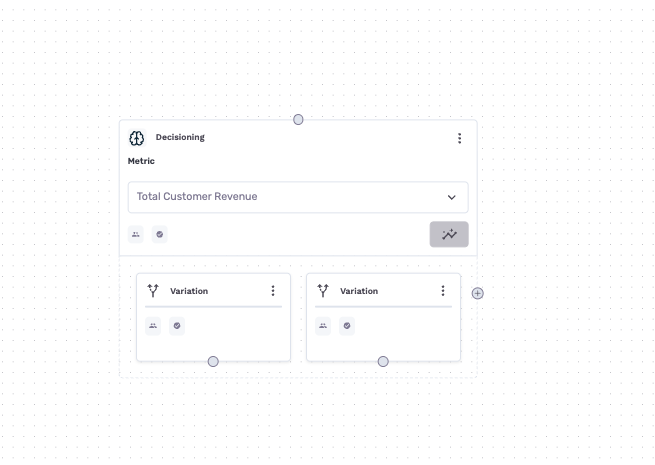
Under the hood, GrowthLoop uses a Bayesian contextual multi-armed bandit with Thompson Sampling, executed entirely in SQL within your data cloud. For 1:1 Personalization, expected reward is modeled as a function of customer features, and the algorithm maintains a posterior distribution over each variation's performance that updates continuously as new data arrives. This means the system makes an outcome-optimizing decision for each customer based on the context features you define.
For Global decisioning, each variation maintains an independent belief about reward likelihood for its arm.
Key properties of this approach:
- Always fresh -- training and inference happen in tight cadences. There is no separate training schedule and no model staleness.
- Composable -- all model state, learning, and decision logic live directly in your warehouse. No data is copied to external model services.
- Transparent -- every assignment decision and its inputs are written to tracking tables you can query directly.
Unlike a standard Experiment node, which uses a fixed percentage, count split or Smart Splitting (see Audiences Experimentation), the Decisioning node uses dynamic allocation that adapts as data comes in. You get the benefits of experimentation with the efficiency of real-time optimization.
| Concept | Description |
|---|---|
| Variation | A journey path (arm) downstream of the decisioning node. Each variation can lead to a different destination, message, delay, or any combination of journey nodes. Variations can be simple (a single destination) or deep (multi-step sub-journeys). |
| Metric | The numeric user KPI that GrowthLoop optimizes for. Select it from the Metrics Builder; it must be associated with the journey's Dataset Group. |
| Decisioning type | Controls how the algorithm learns -- either personalized to each customer's characteristics (1:1 Personalization) or optimized globally across all customers (Global). |
| Context features | Labeled customer attributes that the algorithm uses to personalize which variation each customer receives. Available only in 1:1 Personalization mode. |
What you can optimize
Because decisioning is limited only by what you can build on the journey canvas, it supports a wide range of optimization use cases:
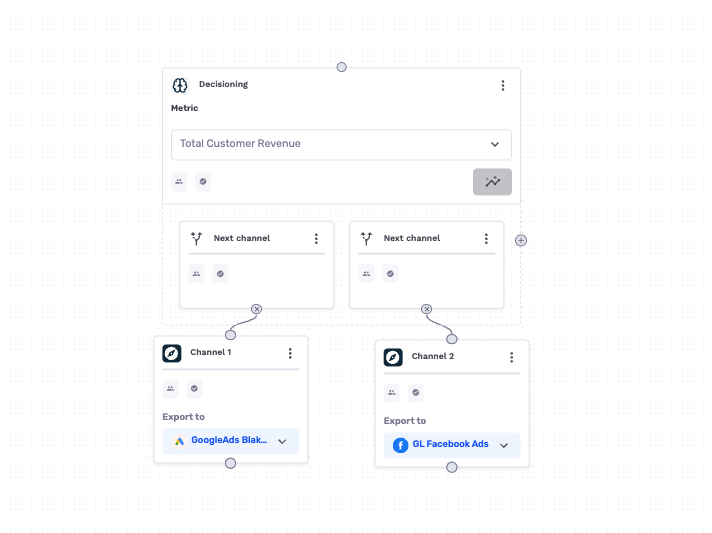
- Next Best channel -- email vs. push notification vs. SMS vs. direct mail
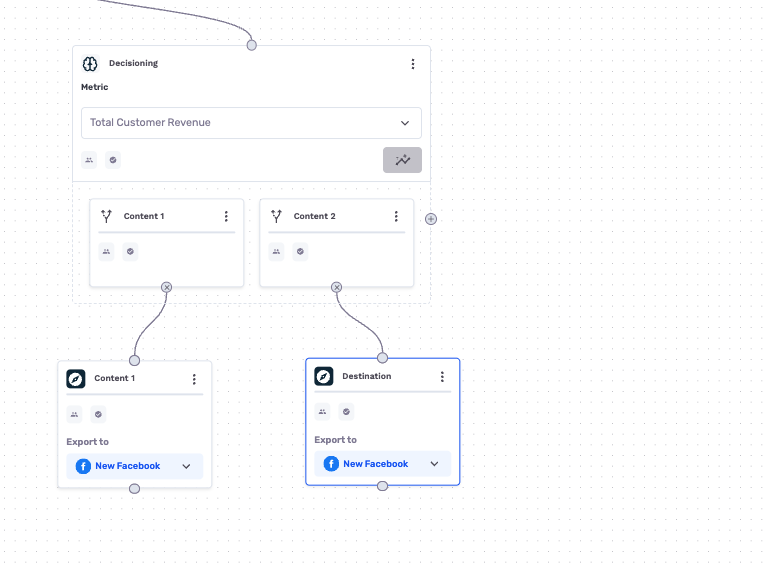
- Next Best content -- different creative variants, offers, or product recommendations
- Next Best timing -- different delay intervals before outreach
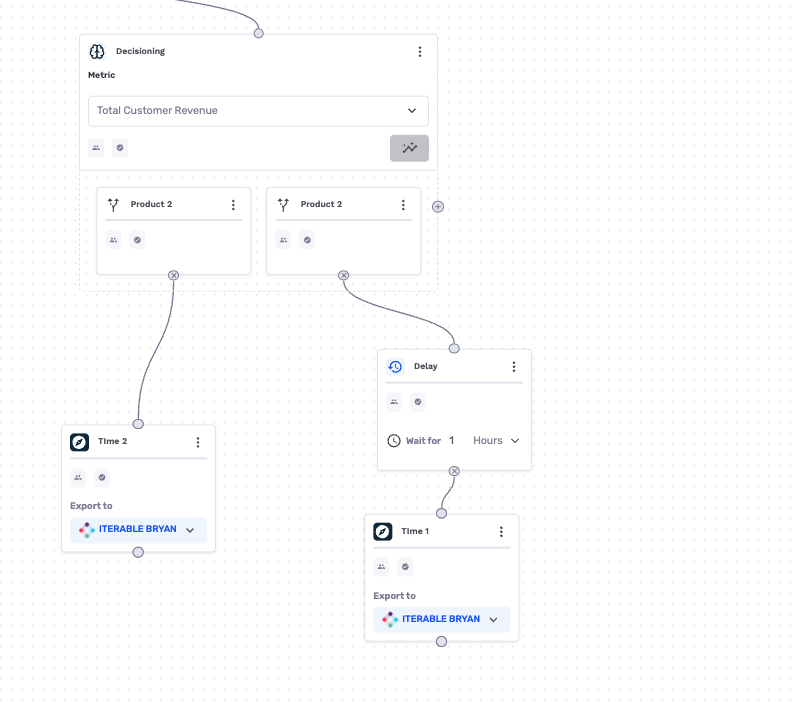
- Next best product -- which product or category to recommend
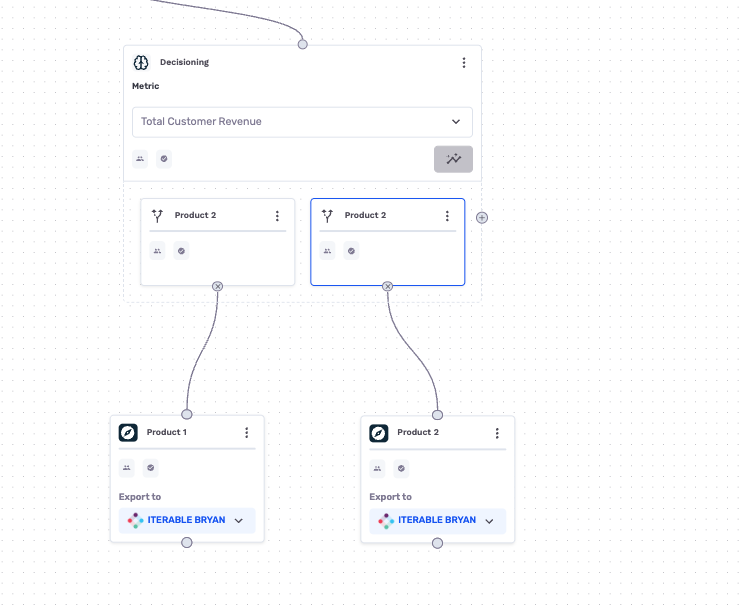
- Omni-channel orchestration -- complex multi-step sub-journeys per variation
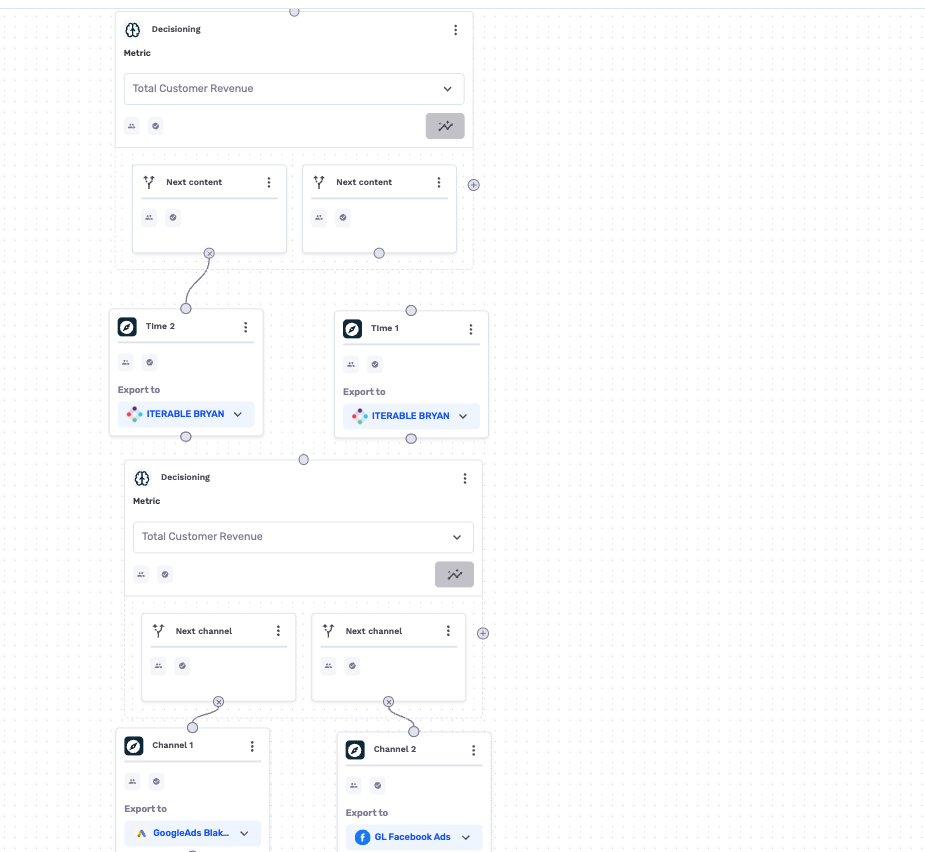
You can place multiple Decisioning nodes in a single journey, each optimizing a different decision point. Each node acts independently, giving you a "journey within a journey" level of flexibility.
NoteThe decisioning algorithm optimizes traffic allocation across the variations you define. It does not automatically discover or generate new variations -- you design the candidate paths, and the AI learns which ones work best for which customers.
Prerequisites
Before adding a Decisioning node to your journey, you need:
- At least one user metric created via the Metrics Builder that tracks a numeric value (e.g., revenue, purchase count, engagement score).
- A journey connected to the same Dataset Group as your metric, so GrowthLoop can evaluate outcomes across your customer base.
- A standard journey. Decisioning is available for one-time, always-on, recurring scheduled, and manual journeys. It is not available for Real-time Journeys.
- If you plan to use 1:1 Personalization, make sure the customer features you want to use are available in your primary dataset and have labels. Choose columns that are strings, numeric, or boolean, and are not PII or a primary ID.
NoteOnly metrics where the underlying field is a numeric type (numbers, integers, decimals) can be used with decisioning. Non-numeric fields like text or dates are not eligible.
NoteIf your base audience is large and your audience growth rate is low, we suggest to batch out the processing of the entry audience using experimentation nodes. For example, we suggest that you process 25% of said audience right away, and the remaining tranches at a later stage, where the batch cadence should be informed by your attribution window, i.e. the amount of time you think it will take for effects to register and be measurable.
Set up a decisioning node
- Open your journey on the journey canvas.
- Drag a Decisioning node from the node library onto the canvas.
- Connect the decisioning node to the preceding node in your journey by dragging from the parent node's output to the decisioning node's input.
Select a metric
- Click on the decisioning node to open its settings panel.
- Under Metric, select the metric you want the algorithm to maximize. If you do not have a metric yet, click Create a metric to maximize to open the Metrics Builder.
NoteA metric must be selected before you can publish the journey. The decisioning node will not function without a target metric.
Configure decisioning settings
- Open Decisioning Settings by clicking the settings icon on the decisioning node.
- Choose a Type:
- Global -- the default. The algorithm learns which variation performs best across all customers without using customer features.
- 1:1 Personalization -- the algorithm learns which variation works best for each customer based on their individual characteristics.
- If you selected 1:1 Personalization, use Select Features to choose the customer features the algorithm should consider. Available features can include labeled fields from your primary dataset and eligible custom attributes.
- (Optional) Turn on Jumpstart to accelerate the learning phase using GrowthLoop's Causal Context Graph.
- (Optional) Turn on Assignment cooldown to prevent users from being reassigned to the same variation within a time window. Enter a whole-number Duration of at least
1, then choose a Time unit: Minutes, Hours, Days, or Weeks.
TipStart with Global optimization when you do not have a strong hypothesis about which customer features should drive the outcome. Choose 1:1 Personalization when customer context is important to the decision.
Add variations
- Add variation paths by clicking the + icon on the decisioning node. Each variation represents a different journey path that customers can be sent down.
- Name each variation by double-clicking its header text (e.g., "Email Offer," "Push Notification," "SMS Reminder").
- Build out the downstream journey for each variation -- connect destination nodes, delay nodes, criteria nodes, or any other node types as needed. Variations can be simple (a single destination node) or deep (multi-step sub-journeys with criteria, delays, and multiple destinations).
- (Optional) Add Custom Attributes to your variation nodes to write back which arm a customer was assigned to. This is useful when the downstream destination needs to know which treatment the customer belongs to -- for example, to serve different content in Braze or Iterable based on the assigned variation.
- Save and Publish your journey to activate the decisioning node.
Once published, GrowthLoop begins assigning customers to variations, tracking metric outcomes, and writing optimization data to tables in your data cloud. The algorithm does not need to "see" the exact content served by downstream destinations -- it is agnostic to treatment context and learns purely from the metric outcomes.
Multi-touch decisioning
Multi-touch journeys let you make more than one optimized decision as a customer moves through a program. You can orchestrate multi-touch decisioning in two ways:
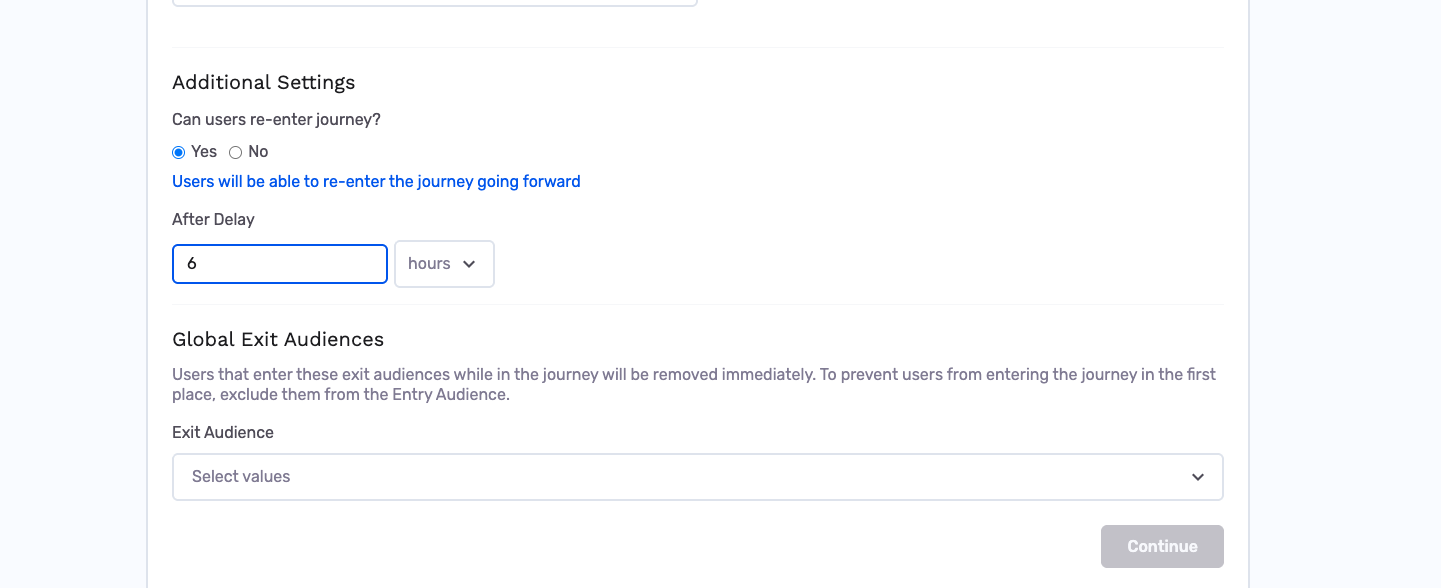
- Use the re-entry criteria for an ongoing journey to define guardrails. For example, create a global exit audience based on conversion when conversion is the decisioning reward.
- Add multiple Decisioning nodes directly to the canvas, where each node represents a touch in the multi-touch flow.
Decisioning types explained
1:1 Personalization
In this mode, the algorithm considers individual customer characteristics when deciding which variation to assign. Two customers with different profiles may be routed to different variations, even at the same point in time.
For example, if you are testing an email offer against a push notification, the algorithm might learn that customers with high engagement scores respond better to push notifications, while less-engaged customers convert better through email offers.
This is what makes GrowthLoop's decisioning fundamentally different from downstream optimization tools (such as those built into ESPs): the algorithm has access to the full breadth of customer context in your data warehouse -- not just the limited signals available to a downstream platform. Combined with the ability to optimize across omni-channel journeys (not just a single channel's content or timing), 1:1 Personalization delivers more effective decisioning because it operates on richer data and a wider scope of interventions.
How features work
When using 1:1 Personalization, the algorithm needs customer attributes (features) to learn from. You enter these via:
- Select Features -- choose the labeled fields and eligible custom attributes that should drive variation performance. Use this when customer context is important to the decision.
NoteFeatures from your primary dataset must have labels to appear in the feature picker. If no features appear, add labels to your dataset columns first. Eligible fields are strings, numeric, or boolean, and must not be PII or a primary ID.
Use re-entry and previous-exposure context
For re-entry journeys, GrowthLoop maintains the journey system field reentry_count. The first entry has a count of 0; each later entry increments the count. GrowthLoop also uses this value internally to vary dynamic bandit sampling between re-entries. However, that internal behavior is separate from the contextual feature vector: to use entry count as a personalization feature, you must create and select a custom attribute for it.
To use exposure from earlier journey nodes as personalization context:
- In Journey Settings, set Can users re-enter journey? to Yes. Configure After Delay and, if needed, an Entry limit. The entry limit includes the first entry; leave it blank for no limit.
- On the Entry node, or another node upstream of Decisioning, add a Custom Attribute for the entry count:
- Set the type to Attribute Formula.
- Give it a stable label, such as
assignment_count. - Set the formula to
journey.reentry_count. Usejourney.reentry_count + 1if the first entry should be represented as1instead of0. If the field is not shown in autocomplete, enter the formula directly.
- On each node whose exposure should be available to a later Decisioning node, add another Custom Attribute. Use a stable label, such as
offer_exposure, and set its value to the treatment or exposure (for example,email_offer_a). You can add these attributes to variation, destination, or criteria nodes. - In Decisioning Settings, choose 1:1 Personalization, open Select Features, and select
assignment_countand the relevant exposure labels. You can select them alongside labeled fields from the primary dataset. - Save and publish the journey.
In a non-re-entry journey, the feature picker includes custom attributes from nodes upstream of the Decisioning node. When re-entry is enabled, it can include labeled custom attributes from the journey, and GrowthLoop carries the latest values from the previous (n-1) entry into the new entry automatically. This makes prior-node exposure available when the user reaches Decisioning again.
Global
In Global mode, the algorithm treats all customers the same and learns a single "best" variation across your entire audience. Customer characteristics are not considered. Each variation maintains its own estimate of expected reward, and the algorithm shifts traffic toward the variation that performs best on average. Global is the default; use it when personalization is not expected to matter or when your audience is very homogeneous.
Additional settings
Jumpstart
Jumpstart uses GrowthLoop's Causal Context Graph to accelerate the learning phase and optimize decisioning results based on causality data tailored to your decisioning settings. You can turn it on or off in Decisioning Settings.
Jumpstart includes business-as-usual (BAU) initialization, which overrides the Causal Context Graph and lets you supply datasets from which BAU can be derived, such as hard allocation rules or predictive NBX model scores.
Assignment cooldown
An Assignment cooldown prevents users from being reassigned to the same variation within a time window. Use a whole-number duration of at least 1 and choose Minutes, Hours, Days, or Weeks. The cooldown is independent of your metric, variation definitions, and journey re-entry delay.
Read the results
As your journey runs and customers flow through the decisioning node, GrowthLoop collects reward data and updates traffic allocation. To inspect the results, click View performance insights on the decisioning node. The insights open in a resizable drawer; the drawer title identifies the decisioning mode.
If the journey has not run yet, the drawer shows No results yet. Please wait for the Journey to run.
Global Decisioning Insights
For Global decisioning, the drawer includes a Last updated timestamp and a summary card for each variation. Each card shows:
- Outcome rate -- the percentage of users with a result for the selected metric
- Users -- the number of users assigned to the variation
- Metric value per user -- the average value of the selected metric per assigned user
The drawer also includes:
- Cumulative Rewards Over Time -- the running total of reward value
- Daily Reward Rate -- each variation's share of the total reward rate for that day
- Daily Traffic Allocation -- the daily split of traffic across variations; a higher share indicates more exploitation of a leading variation, while a balanced split indicates that the algorithm is still finding a winner
1:1 Personalization Insights
For 1:1 Personalization, the upgraded drawer begins with Filter results and a grid of cards for the available variations. Use the filter to inspect performance for the relevant feature or segment. Each card shows the selected metric's outcome rate, metric value per user, and user count; the labels are derived from the metric you selected (for example, Users with [metric] and [metric] per user). Compare cards within the same filtered context to understand how the selected customer features change which variation performs best.
GrowthLoop writes detailed evaluation data to tracking tables in your own data cloud, within the GrowthLoop system schema. Your data never leaves your environment.


Example: optimizing a cross-sell journey
Here is a concrete example -- determining the best channel for a cross-sell offer.
- Create a metric called "Cross-Sell Revenue" in the Metrics Builder. Choose the
transactionsDataset, select thepurchase_amountfield, set the calculation method to Total, and pickorder_dateas the date field. - Create a journey for customers who recently purchased Product A. Set the entry criteria to customers with a purchase in the last 14 days.
- Add a Decisioning node after the entry node. Select "Cross-Sell Revenue" as the metric to maximize.
- Configure settings -- choose 1:1 Personalization and use Select Features to choose labeled customer attributes. Optionally enable Jumpstart or an Assignment cooldown.
- Create three variations:
- Variation 1: Email destination with a personalized product recommendation
- Variation 2: Push notification with a limited-time discount code
- Variation 3: SMS with a direct link to the recommended product
- Publish the journey. GrowthLoop begins assigning customers to variations and tracking revenue outcomes.
- Monitor results over the following weeks. The algorithm will learn which channel drives the most cross-sell revenue for different customer segments and automatically shift traffic toward the winning paths.
Why composable decisioning
Traditional approaches to marketing decisioning fall into two categories, both with significant limitations:
- In-house / intuition-based -- decisions are made based on correlational data or institutional knowledge. Without causal measurement, these approaches are as likely to decrease performance as to improve it.
- Downstream platform decisioning (e.g., built into ESPs or point solutions) -- models are trained off-premises on limited data, restricted to the intervention dimensions the platform controls (e.g., email content and timing only), and can grow stale between reverse-ETL sync cycles.
GrowthLoop's decisioning is composable: all model training, inference, and decision logic execute directly in your data cloud alongside your complete customer data. There is no external model service, no data leaving your environment, and no separate training schedule -- the model learns continuously with every journey run.
This means you can optimize over the full scope of your marketing programs (omni-channel, multi-step journeys) using the richest possible customer context, without the data integration overhead that downstream decisioning tools require.
Best practices
- Start with at least two variations that are meaningfully different -- different channels, different messages, or different timing. Small cosmetic differences are unlikely to produce learnable patterns.
- Choose a metric that reflects your campaign goal. If you are running a re-engagement journey, optimize for login count or session frequency rather than revenue.
- Give the algorithm time to learn. Meaningful optimization typically requires enough customers to flow through each variation. Avoid making changes to the journey or metric configuration while the algorithm is actively learning.
- Use 1:1 Personalization for diverse audiences. If your audience spans different customer segments with different behaviors, personalization gives the algorithm more signal to work with.
- Use multiple Decisioning nodes when your journey involves several independent decision points (e.g., which channel to use and which offer to show). Each node optimizes its own decision independently.
- Don't change the metric mid-journey. If you need to track a different KPI, create a new journey with the updated metric instead.
- Multi-touch. If your regular marketing initiatives are built around multi-touch, make sure to represent multi-touch in a decisioning journey.
Frequently asked questions
How long until the algorithm starts optimizing? The algorithm begins learning from the first customers that flow through the decisioning node. Meaningful optimization typically starts once enough data has accumulated across all variations -- usually after several hundred customers have been assigned. The exact timeline depends on your journey's traffic volume and the variance in your metric.
How many variations can I add? You can add as many variations as you need. However, more variations means the algorithm needs more data to learn which ones perform best. We recommend starting with 2--4 variations for the best balance of exploration and optimization speed.
Where is the optimization data stored? GrowthLoop writes all decisioning and evaluation data to tracking tables in your own data cloud, within the GrowthLoop system schema. Your data never leaves your environment.
Can I use Decisioning with any journey schedule? Decisioning works with standard journey schedules -- one-time, always-on, recurring, and manual. It is not available for Real-time Journeys.
What is Jumpstart? Jumpstart uses GrowthLoop's Causal Context Graph to accelerate the learning phase and optimize decisioning results based on causality data tailored to your decisioning settings.
How do I prevent repeat assignments? Turn on Assignment cooldown in Decisioning Settings, enter a duration of at least 1, and choose a time unit. The setting prevents users from being reassigned to the same variation within that window.
Does the AI need to know what content is served downstream? No. The decisioning algorithm is agnostic to treatment context -- it learns purely from the metric outcomes observed for each variation. You can use Custom Attributes on variation nodes to write back which arm a customer was assigned to, so downstream destinations can serve the appropriate content.
Can I have multiple Decisioning nodes in one journey? Yes. Each Decisioning node operates independently, optimizing its own set of variations against its own metric. This lets you make multiple optimized decisions within a single journey flow.
What happens if I change the journey after publishing? If you modify the journey structure or the decisioning node configuration, the algorithm may need to re-learn. Avoid making changes to a running journey unless necessary.
You’re ready to publish your decisioning journey and let GrowthLoop learn which variation best supports your selected metric.
NoteExperiencing any issues? Reach out to us at [email protected] and we'll help resolve the matter.
Updated 7 days ago