
Audience generation
Generate audience suggestions with Marve, then review them in GrowthLoop.
Use audience generation when you know the campaign goal but do not want to build every filter by hand. Marve turns your prompt into one or more audience suggestions for the audience builder.
How audience generation works
| Step | What happens |
|---|---|
| 1. Prompt | Describe the campaign goal, target population, signals, timeframe, and exclusions. |
| 2. Map | Marve maps your intent to available fields and dataset relationships. |
| 3. Validate | Marve checks values, joins, and counts before returning a suggestion. |
| 4. Review | Open the audience suggestion, review the logic, edit if needed, then save or export. |
Generated suggestions do not automatically create or export audiences. You decide what to save and activate.
Write a strong audience prompt
Include these details when you can:
- Objective: what you want the campaign to accomplish.
- Population: product tier, geography, account type, lifecycle stage, or customer type.
- Signals: behaviors, transactions, engagement, support activity, or model scores.
- Timeframe: the period Marve should evaluate.
- Exclusions: customers or accounts that should not be included.
| Vague prompt | Better prompt |
|---|---|
| "Find customers who might churn." | "Generate an audience of Enterprise customers who have not logged in for 30 or more days, have an open support ticket in the last 14 days, and have not expanded seat count in the last 90 days." |
| "Create a cross-sell audience." | "Generate an audience of customers who bought running shoes in the last 180 days, have not bought athletic apparel, and opened at least one email in the last 60 days." |
| "Give me winback ideas." | "Generate three winback audiences for customers who purchased before but have not purchased in the last 120 days. Prioritize high lifetime value and email eligibility." |
Generate an audience
- Open Studio.
- Select the Dataset Group for the audience.
- Add any relevant goals in the prompt controls.
- Enter a specific audience prompt.
- Send the prompt.
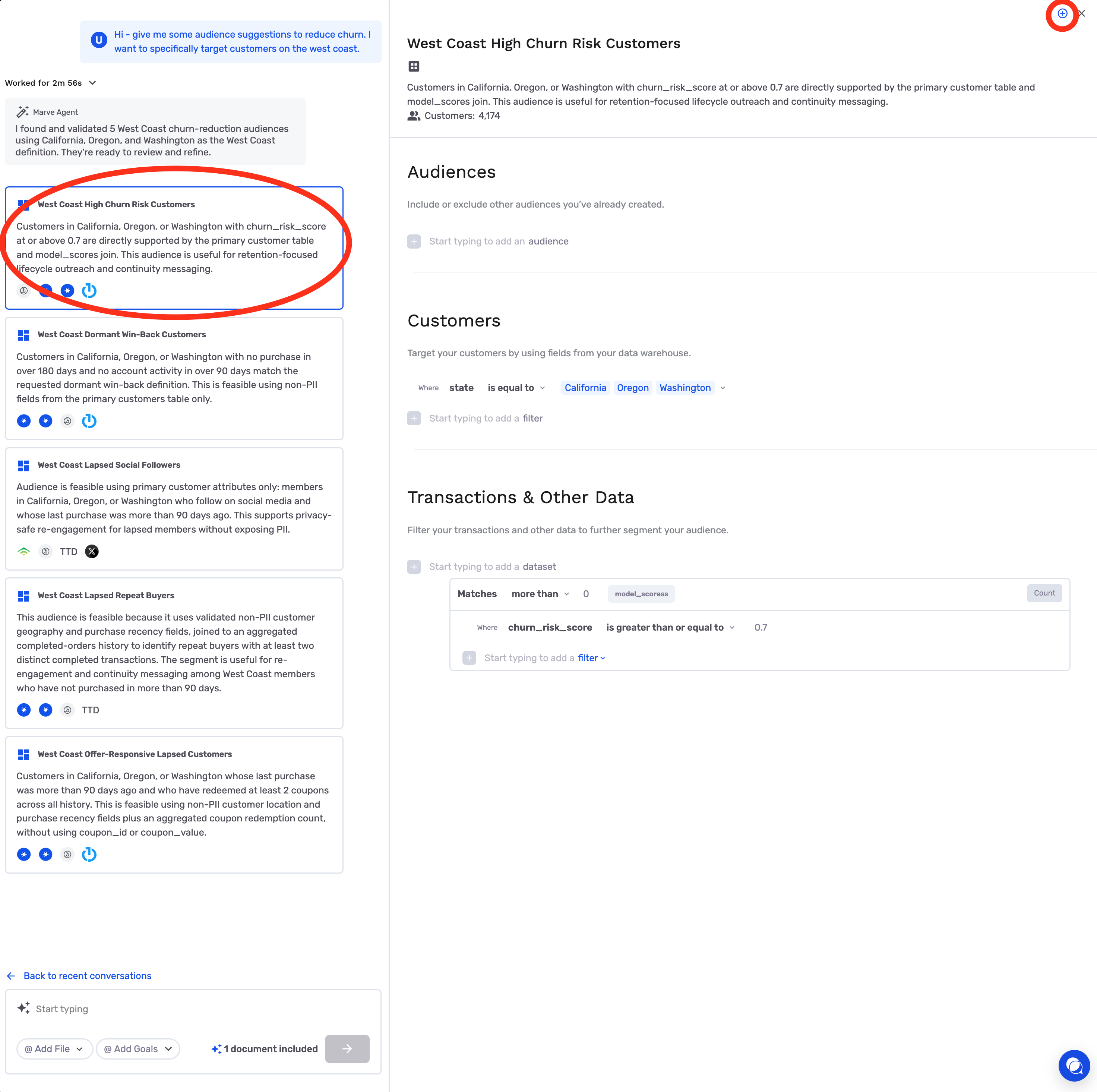
- Review the generated audience suggestions.
- Open a suggestion in the audience builder.
- Review the filters, joins, and audience size.
- Save the audience when it matches your intent.
Review before you activate
Before saving or exporting a generated audience:
- Confirm the audience size is plausible.
- Review each filter and exclusion.
- Check that dates match your intended timeframe.
- Confirm Marve used the right dataset relationships.
- Spot-check the logic with a teammate when the campaign is high impact.
Iterate on the suggestion
Use specific follow-ups to refine the result:
- "Add customers with at least two purchases in the last 90 days."
- "Exclude anyone who received a winback email in the last 30 days."
- "Limit this to customers in California and New York."
- "Create two more variants: one for high spend and one for high engagement."
- "Explain which fields you used for churn risk."
Common mistakes
| Mistake | What to do instead |
|---|---|
| Prompt is too vague | Add objective, population, signals, timeframe, and exclusions. |
| First output is treated as final | Review the logic and expect one or two refinements. |
| Context Manager is empty | Add definitions and exclusions before repeated audience work. |
| The user starts over too soon | Refine the current suggestion with a targeted follow-up. |
| No one reviews the logic | Check filters and counts before activation. |
Congratulations! You can now generate and refine audiences with AI Studio. Continue to Audience Discovery for suggested audiences on Home.
Updated 3 months ago
Did this page help you?