
The Trade Desk Conversions
Use warehouse conversion events for Trade Desk measurement and attribution.
Connect this destination to write warehouse conversion events onto The Trade Desk, for use in measurement and attribution. You do not need an audience.
This destination writes to your Trade Desk account and is a good fit when you want to:
- Get measurement and attribution in The Trade Desk
- Use a warehouse table that has conversion events with timestamps
- Provide at least one supported identity or an impression ID
This maps to GrowthLoop Syncs:
| Use it for | Syncs |
|---|---|
| Sending conversion events for measurement and attribution | ✓ |
Do not use this workflow to add contacts to a targeting audience. To activate customers for targeting, use The Trade Desk or The Trade Desk CRM. To publish provider-owned segments for other advertisers, use The Trade Desk Marketplace.
Prerequisites
Make sure you have:
- An active The Trade Desk advertiser account with offline conversion access. If you do not have one, contact The Trade Desk here.
- Your Advertiser ID.
- A Platform API key (
TTD-Auth) used to validate access and manage offline tracking tags. - Your offline data provider secret (labeled Advertiser Secret in GrowthLoop). This is the data provider secret for your Offline Data Provider ID, not the advertiser first-party secret from Advertiser Preferences > Seat Identifiers & Keys in The Trade Desk. Obtain it from your Trade Desk Technical Account Manager (TAM) for the provider ID you configure on the destination.
- Your Data Provider ID (optional if GrowthLoop already has a provider ID configured for your organization). Ask your TAM if you are unsure.
- UID2 resolution for your organization if you plan to map email or phone. See UID2 identifiers.
NoteDo not reuse first-party, CRM, or Marketplace secrets for this destination. GrowthLoop signs offline conversion uploads with the offline data provider secret.
Set up The Trade Desk Conversions as a destination
- In GrowthLoop, click the Destinations tab on the left sidebar.
- Click New Destination on the upper right side.
- Search for The Trade Desk: Offline Conversion and click Add The Trade Desk: Offline Conversion.
- Enter the required information, then click Create.
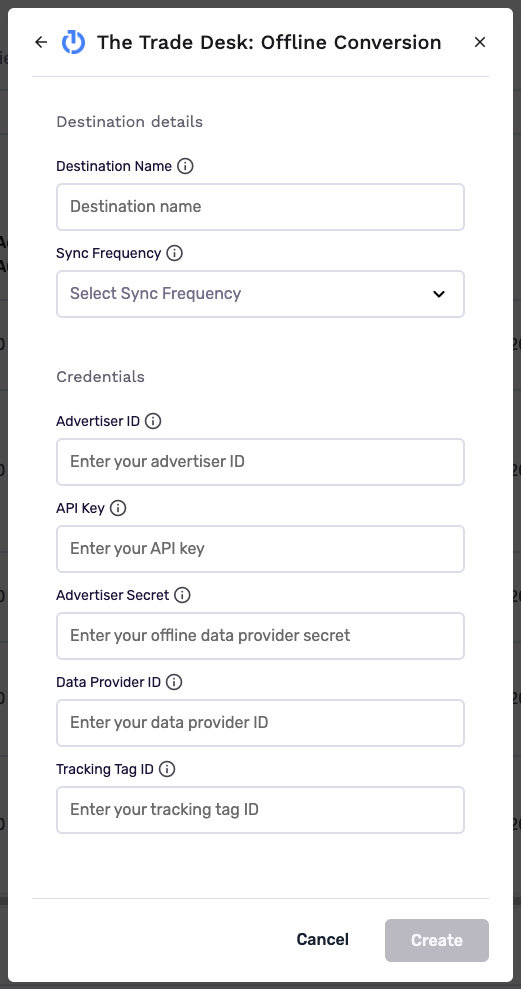
| Field | Description |
|---|---|
| Destination Name | Name this destination in GrowthLoop. Use a name so your team recognizes its purpose, like "Trade Desk Conversions". |
| Sync Frequency | Set the default sync frequency (for example, daily or weekly). You can override this setting for individual syncs. |
| Advertiser ID | Your Trade Desk advertiser identifier. |
| API Key | Your Trade Desk Platform API key (TTD-Auth) you've created. |
| Advertiser Secret | Enter the data provider secret for your Offline Data Provider ID. This is not the advertiser first-party secret from Advertiser Preferences > Seat Identifiers & Keys in The Trade Desk. The Trade Desk uses this key to validate the TtdSignature HMAC-SHA1 header on POST /providerapi/offlineconversion. Obtain the secret from your TAM for the provider ID entered in Data Provider ID (or the provider ID GrowthLoop has configured for your organization). |
| Data Provider ID | Optional. If you leave this blank, GrowthLoop uses the Trade Desk data provider ID configured for your organization. Your TAM issues the Advertiser Secret for this provider ID. |
GrowthLoop validates the credentials against The Trade Desk Platform and Offline Conversion APIs. The Trade Desk: Offline Conversion then appears in your list of connected destinations.
Create a sync in GrowthLoop
Create a sync from a warehouse table to write conversion events onto The Trade Desk. See Syncs for information on how to complete those steps.
Select an Object Type:
| Object | Use it for | Sync modes |
|---|---|---|
| Offline Conversion | Conversion events for measurement and attribution | Insert only |
When you configure the sync:
- Update Rule: Choose Insert only. This destination adds new conversion events and does not update or remove previously uploaded conversions.
- Dataset/Table: Select the table that holds your conversion events. Use a unique event key so you do not re-send the same conversion.
- Connection: Select your The Trade Desk: Offline Conversion destination.
- Object Type: Select Offline Conversion.
- Match Field: Map a stable identity such as
email,uid2,tdid, or another supported identifier.
Each row needs a timestamp and at least one supported identity or impression ID. Because this destination is insert-only, re-sending the same event can create duplicate conversions.
Required event fields
| Destination field | Description |
|---|---|
| Timestamp UTC | When the conversion occurred, in UTC. Use ISO 8601 format, for example 2026-07-29T10:00:00Z. Do not use a future time. |
| At least one identity or Impression ID | Include a usable identity on every event. See Supported identities. |
Supported identities
Map at least one of the following. A single row can include more than one identifier. GrowthLoop drops rows with no usable identity and counts them as failed.
| Match field | Description |
|---|---|
| Trade Desk ID (TDID) | The Trade Desk user identifier |
| Device advertising ID (DAID) | Device advertising ID (IDFA or AAID) |
| UID2 | Raw Unified ID 2.0 |
| UID2 token | UID2 in token form |
| Email→UID2 | Email address. GrowthLoop resolves it to a raw UID2 before upload and never sends raw email to The Trade Desk |
| Phone→UID2 | Phone number, preferably E.164. GrowthLoop resolves it to a raw UID2 before upload and never sends raw phone to The Trade Desk |
| Identity Link (IDL) | LiveRamp IdentityLink / RampID-style identifier supported by The Trade Desk offline conversion API |
| EUID / EUID token | European Unified ID and its token form |
| Impression ID | GUID linking the conversion to a Trade Desk impression. Use this when you do not have another user identifier |
GrowthLoop resolves email and phone to UID2 through the UID2 identity service. See UID2 identifiers.
Optional conversion fields
| Destination field | Description |
|---|---|
| Tracking Tag ID | The offline tracking tag that should receive the event |
| Event Name | A label for the conversion event. If you omit it, GrowthLoop defaults to the sync name |
| Value | Monetary value of the conversion |
| Value Currency | Currency code for Value, for example USD |
| Order ID | Order or transaction identifier |
| Referrer URL | Referrer URL associated with the conversion |
| Client IP Address | Client IP address associated with the conversion |
| Country | Full country name. If you map Country, also map Region. GrowthLoop rejects rows that include country without region |
| Region | Region or state. Required when you map Country |
| Metro | Metropolitan area geotargeting code |
| City | City name |
| Postal Code | Postal or ZIP code |
| TD1–TD10 | Custom reporting fields, max 64 characters each |
| Privacy Type / Privacy Applicable / Consent String / Privacy Settings | Optional privacy metadata for the conversion event |
See The Trade Desk Offline Conversion API for field definitions.
Sync behavior
This is what GrowthLoop writes when you sync conversion events to The Trade Desk.
| Behavior | What happens |
|---|---|
| When it runs | GrowthLoop sends the sync as a batch on the next successful run. |
| Insert only | GrowthLoop adds new conversion events. Syncs do not update or remove previously uploaded conversions. |
| Duplicate-event risk | Re-sending the same event can create duplicate conversions in The Trade Desk. Use unique event keys in your source table. |
| Batching | GrowthLoop uploads conversions in batches of up to 3,000 events, matching The Trade Desk API limits. |
| Rate limits | If The Trade Desk rate-limits an upload, GrowthLoop retries with backoff. |
| Raw PII | When you map Email→UID2 or Phone→UID2, GrowthLoop resolves those values to a raw UID2 before it sends the event. |
| Deletes | GrowthLoop does not delete previously uploaded conversion events. |
| Missing identifier | Rows without the required identifier fail. |
Confirm the export was successful
When the run finishes, confirm you can use the data in The Trade Desk.
- Offline Conversion sync: Open the tracking tag you configured and confirm the latest conversion events.
This workflow does not create a targeting audience.
In GrowthLoop, confirm the sync appears in the Syncs table. See Syncs for more information.
Congrats on successfully exporting to The Trade Desk Conversions!
Troubleshooting
These are the issues we see most often. You can always email us at [email protected] for help.
| Problem | Cause | Resolution |
|---|---|---|
| Connection fails to validate | Advertiser Secret is the advertiser first-party secret | Use the offline data provider secret from your TAM. |
| Rows fail | Timestamp or identity is missing | Include a timestamp and at least one identity or impression ID on every event. |
| Country rows fail | Region is missing | If you mapped Country, also map Region. |
| Duplicate conversions appear | The same event was sent more than once | Use unique event keys. This destination is insert-only. |
Updated about 1 month ago