
Adobe Campaign Classic
Use GrowthLoop audiences for Campaign Classic recipients and Message Center email.
Connect this destination to export audience membership as Campaign recipients, or to send Message Center email from a journey Destination Node, for use in Campaign Classic.
This destination writes to your Adobe Campaign Classic account and is a good fit when you want to:
- Use GrowthLoop audiences written as Campaign recipients
- Send Message Center PushEvent email from a journey
This maps to GrowthLoop Audiences and Journeys:
| Use it for | Audiences | Journeys |
|---|---|---|
| Adding and removing Campaign recipients | ✓ | ✓ |
| Sending a Message Center transactional email | ✓ |
This destination does not support Adobe Campaign Standard or the mc.adobe.io gateway. If you activate in Experience Platform, use Adobe Experience Platform.
Prerequisites
Make sure you have:
- An Adobe Campaign Classic v8 Managed Cloud instance.
- Access to the Adobe Developer Console so you can create a project with OAuth Server-to-Server credentials.
- Your Campaign Instance URL, for example
https://your-instance.campaign.adobe.com. - Your Message Center execution URL if realtime transactional sends use a different host than the marketing instance.
NoteGrowthLoop calls the Campaign SOAP router at
/nl/jsp/soaprouter.jspon your instance. You do not enter that path. GrowthLoop appends it to the Instance URL.
Set up Adobe Campaign Classic as a destination
- In the Adobe Developer Console, create or open a project.
- Add the Adobe Campaign API.
- Configure OAuth Server-to-Server credentials and copy the Client ID and Client Secret.
- In GrowthLoop, click the Destinations tab on the left sidebar.
- Click New Destination on the upper right side.
- Search for Adobe Campaign Classic and click Add Adobe Campaign Classic.
- Enter the required information, then click Create.
| Field | Description |
|---|---|
| Destination Name | Name this destination in GrowthLoop. Use a name so your team recognizes its purpose, like "Campaign Classic Email". |
| Sync Frequency | Set the default export frequency (for example, daily or weekly). You can override this setting for individual exports. |
| Instance URL | Your Campaign v8 Managed Cloud host. Do not use Campaign Standard or mc.adobe.io. |
| Message Center execution URL (optional) | Host for realtime PushEvent sends. Leave blank when it matches Instance URL. |
| Client ID | OAuth Server-to-Server client ID from your Developer Console project. |
| Client Secret | OAuth Server-to-Server client secret. |
| Recipient reconciliation key | The Campaign recipient attribute GrowthLoop uses to upsert and delete rows. Choose Email, Mobile phone, or Custom attribute. |
| Custom recipient attribute | Required when the reconciliation key is Custom attribute. Enter the exact nms:recipient attribute name, for example membershipId. |
GrowthLoop validates the credentials. Adobe Campaign Classic then appears in your list of connected destinations.
Export to Adobe Campaign Classic
From within GrowthLoop, export from an audience or from a journey Destination Node. See Export an audience or Build a journey if you need more information on these steps.
After building or selecting an audience, click Export, then search for Adobe Campaign Classic. In a journey, add a Destination Node and select Adobe Campaign Classic.
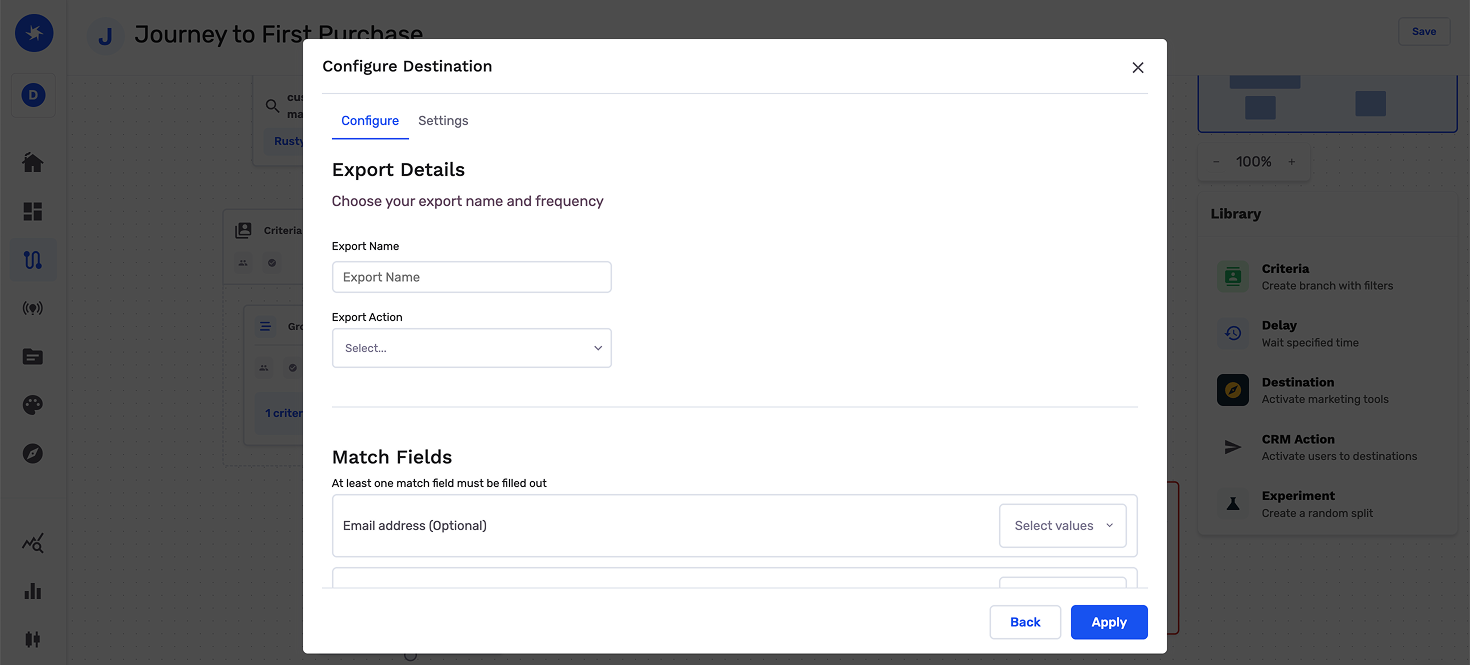
To write recipients only, keep the export action on Add to list only. To send Message Center email, see Send email from a journey.
Map contact identifiers
Map the warehouse column that matches the destination Recipient reconciliation key.
| Reconciliation key | What to map |
|---|---|
| Recipient email | |
| Mobile phone | Recipient mobile phone |
| Custom attribute | The custom nms:recipient attribute you entered on the destination |
Optionally map personalization fields to write extra values onto the recipient record. You can also map custom attributes from the audience or from the journey as additional fields.
Configure the export
This is where you set the campaign type and schedule for audience exports. On a journey Destination Node, you set timing on the journey canvas.
| Setting | Audience export | Journey Destination Node |
|---|---|---|
| Export Name | Defaults to the audience name. | Required. Enter a name so you can find the export in GrowthLoop. |
| Campaign type | Choose a one-time or ongoing export. | The journey schedule controls when the journey runs and contacts are sent to Adobe Campaign Classic. |
| Inclusion criteria | Choose all members or newly added members. | The journey sends contacts who reach the Destination Node. |
| Schedule | Set frequency, start date, and end date. | Users reach this node when the journey runs. Add a Delay Node or set Criteria Evaluation to control timing. |
| Personalization fields | Optional fields written onto the recipient. | Optional fields written onto the recipient. |
Export behavior
This is what GrowthLoop writes when you export an audience.
| Behavior | What happens |
|---|---|
| What GrowthLoop writes | Campaign recipients (nms:recipient) over SOAP, or a Message Center PushEvent. Direction is GrowthLoop → Adobe Campaign Classic. |
| When it runs | GrowthLoop sends the export as a batch on the next successful run. An export that starts Now runs within about 15 minutes. Journeys send exports on demand when users reach the Destination Node. |
| Add to list only | GrowthLoop upserts members as nms:recipient records over SOAP Write. Members who leave are removed using the reconciliation key. |
| Send Email | GrowthLoop sends a Message Center PushEvent for each user who reaches the journey node. See Send email from a journey. |
| Reconciliation | Email, mobile phone, or a custom attribute identifies the recipient for upsert and delete. |
| One-time exports | GrowthLoop upserts current members once and does not remove anyone later. |
| Ongoing adds and removals | Ongoing exports upsert contacts who enter and remove contacts who leave, using the reconciliation key. |
Send email from a journey
You can send a Message Center transactional event from a journey Destination Node. See Build a journey if you need more information on these steps.
- Add a Destination Node and select your Adobe Campaign Classic destination.
- Select Send Email as the export action.
- Map Recipient's Email. Message Center PushEvent requires email.
- Choose the Message Center realtime event type or template.
- Map Template Variables to the
rtEvent.ctxvariables the event expects. - Send a test email before you publish.
Send behavior
| Behavior | What happens |
|---|---|
| Trigger | GrowthLoop calls Message Center PushEvent for each user who reaches the node. |
| Host | GrowthLoop uses the Message Center execution URL, or Instance URL when that field is blank. |
| Recipient email | Send Email always requires a mapped recipient email, even if the destination reconciliation key is mobile phone or a custom attribute. |
| Audience membership | Send Email does not upsert or delete recipients. Use Add to list only to sync the list. |
Confirm the export was successful
When the run finishes, confirm you can use the data in Adobe Campaign Classic.
- Audience export: Look up a recipient under Profiles and Targets / Recipients.
- Journey Destination Node: Look up a recipient who reached the node under Profiles and Targets / Recipients.
- Send Email: Confirm the selected Message Center event for a contact who reached the node.
In GrowthLoop, review counts on the audience Exports tab, or open the Activity tab on the journey Destination Node. See Export an audience or Monitor a journey for more information.
Congrats on successfully exporting to Adobe Campaign Classic!
Troubleshooting
These are the issues we see most often. You can always email us at [email protected] for help.
| Problem | Cause | Resolution |
|---|---|---|
| Connection fails to validate | The instance is Campaign Standard or mc.adobe.io | Connect Campaign Classic v8 Managed Cloud |
| SOAP writes fail | The instance URL is not the marketing host, or GrowthLoop cannot reach the SOAP router | Confirm the instance URL is the marketing host and GrowthLoop can reach /nl/jsp/soaprouter.jsp |
| Custom reconciliation fails | The nms:recipient attribute name does not match | Enter the attribute name exactly, including capitalization |
| Send Email does not send | Recipient email is not mapped, or the Message Center event is not on the execution host | Map Recipient's Email and confirm the event is available on the execution host |
Updated about 1 month ago