
UID2 identifiers
Learn what UID2 is, how to configure it on a dataset group, where the GrowthLoop-managed cache dataset lives, and how to use UID2 when exporting.
UID2 (Unified ID 2.0) is a privacy-conscious advertising identifier generated from first-party email addresses or phone numbers. Supported destinations use it to match audience members for activation without relying on third-party cookies.
In GrowthLoop, you configure UID2 once on a dataset group, then enable Use UID2 for any export to a supported destination. The same setup is reused across exports, so you do not need to configure UID2 separately each time.
How it works
- Configure the UID2 source on your dataset group under Group Info.
- When you export an audience to a supported destination, enable Use UID2.
- GrowthLoop includes the UID2 identifiers configured for that dataset group in the export.
NoteUID2 support starts with The Trade Desk. Additional destinations may be added over time.
Key concepts
| Concept | Description |
|---|---|
| UID2 | A privacy-preserving identifier advertising platforms use to match users. |
| UID2 source | Dataset group setting that defines where UID2 values come from. |
| Bring your own UID2 | You already store UID2 values in your warehouse and map the dataset and column. |
| GrowthLoop-managed | GrowthLoop provisions a UID2 cache table in your warehouse (in the source connection's system schema) and adds it as a dataset on the group. |
| Use UID2 | Export toggle that includes the dataset group's UID2 identifiers in the export. |
Prerequisites
Before you begin, make sure you have:
- A dataset group that powers the audiences you plan to export
- Permission to edit that dataset group (Group Info)
- A destination that supports UID2 (starting with The Trade Desk)
Set up UID2
Configure UID2 on the dataset group so every export from that group can use it.
- Navigate to Datasets and open the dataset group you want to configure.
- Click Edit, then open Group Info.
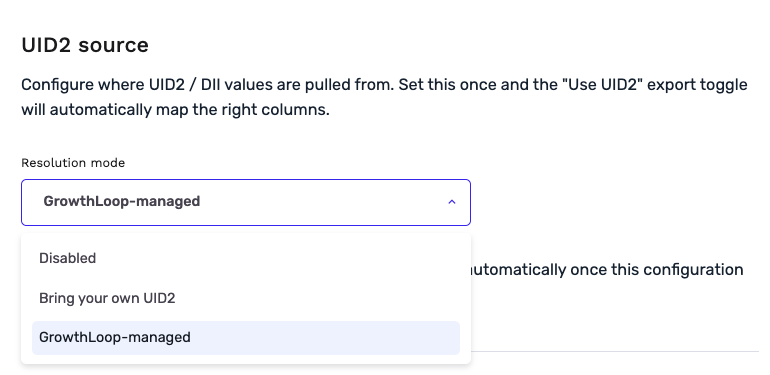
- Under UID2 source, choose how UID2 values are provided:
- Bring your own UID2 — Select the dataset and column that already hold UID2 values to export.
- GrowthLoop-managed — GrowthLoop provisions and manages the UID2 cache table automatically. You do not need to map a UID2 column.
- Save the dataset group.
NoteUntil UID2 is configured on the dataset group, the Use UID2 toggle on export stays disabled. From the export modal you can open Manage to jump back to Group Info and finish setup.
GrowthLoop-managed UID2 cache
When you choose GrowthLoop-managed, GrowthLoop creates a cache table in your data warehouse and adds it as a dataset on the dataset group. You do not map a UID2 column yourself.
Where it lives
- The table is created in the system schema on your source connection (commonly named
flywheel_system). - Warehouse table name:
uid2_table_{dataset_group_id}(for example,uid2_table_12) - Dataset display name:
UID2 Cache (Group {id})
How it is used
- GrowthLoop joins the cache dataset to the primary dataset on your unique customer ID. The cache table's join column is
client_customer_id. - UID2 values used at export live in
uid2_payload. - GrowthLoop creates the table when you save GrowthLoop-managed configuration. Identifiers are written and updated as audiences are exported.
- If you switch to Bring your own UID2 or disable UID2, GrowthLoop detaches the join. The cache table and dataset stay in the warehouse so you can re-enable without recreating them.
NoteIdentifiers appear in the cache table after exports run. They may not be present the instant you save the setting.
WarningDo not edit or drop this table. GrowthLoop manages it for you.
Use UID2 during export
After the dataset group is configured, include UID2 identifiers when you export.
- Navigate to Audiences and open an audience built on that dataset group.
- Click Export.
- Select a destination that supports UID2 (starting with The Trade Desk).
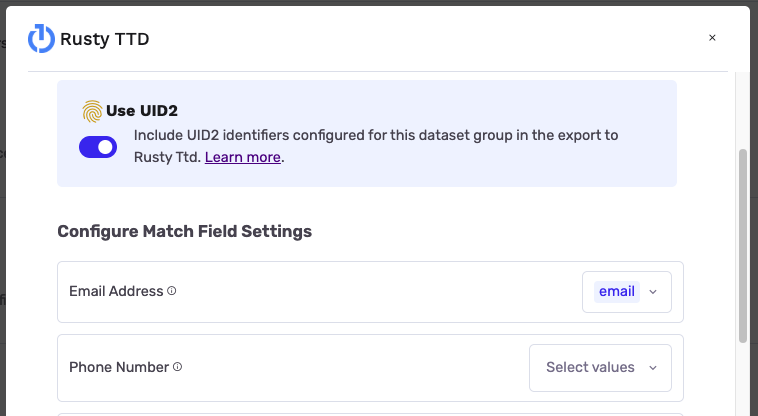
- Enable Use UID2 so GrowthLoop includes the identifiers configured for the dataset group.
- Complete your remaining export settings—export name, schedule, and any other match fields—then click Export.
TipMapping additional match fields supported by the destination can further improve match rates. See The Trade Desk for the identifiers that destination accepts.
You're all set to use UID2 with your GrowthLoop exports!
NoteExperiencing any issues? Reach out to us at [email protected] and we'll help resolve the matter.
Updated about 1 month ago