
Audience channel performance
Review paid media and email campaign results for GrowthLoop audiences across destinations.
Use Channel Performance in Insights to compare paid media and email campaign results across audiences and destinations. Review totals, trends, and campaign details for the warehouse source and date range you select.
You can also review the report in an audience's Campaign tab, where results are scoped to that audience.
Prerequisites
- A GrowthLoop admin must enable the Channel Performance organization setting before you can use this feature. Contact [email protected] if the report is locked.
- Have campaign reporting data available for your warehouse source. Exporting an audience alone does not supply campaign engagement or conversion metrics. Ask support to confirm that reporting data is configured for your destinations.
Review channel performance
Review campaign totals, trends, and details from Insights or from an audience's Campaign tab.
NoteIf the report displays Demo data, it shows sample results rather than your organization's campaign data.
From Insights
- Click Insights in the left sidebar.
- Select the Channel Performance tile in the report catalog.
- Select a Source connection at the top of the report.
- Set Start date and End date. The default range covers the last 30 days.
- Select Ads or Email above the results.
- Select an Audience and a destination to narrow the results, or keep All audiences and All destinations.
- Review the metric totals, Campaign Metrics Over Time chart, and Campaign Details table. Use the chart's metric selector to switch between measures.
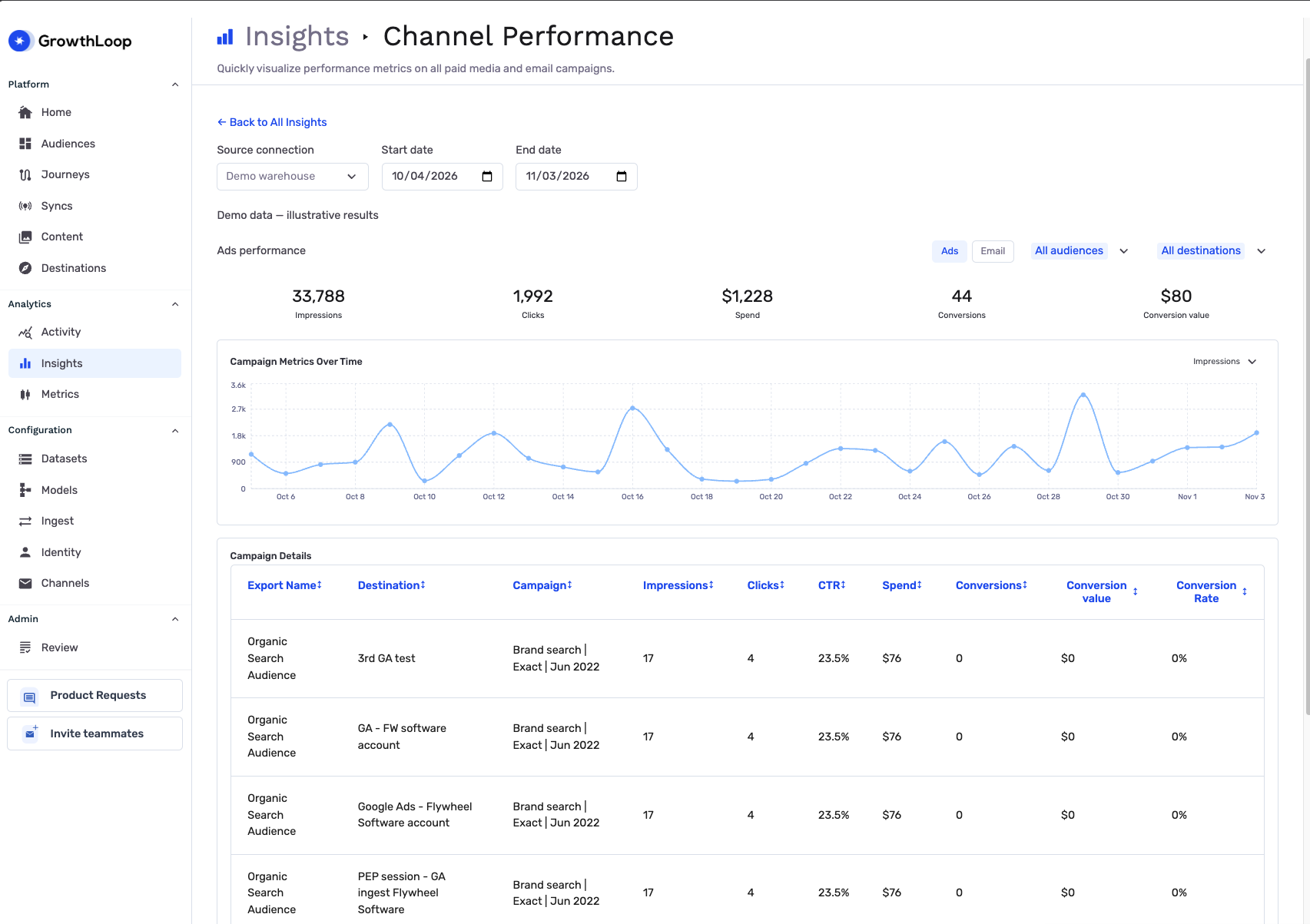
Changing between Ads and Email resets the audience and destination filters.
From an audience
- Click Audiences in the left sidebar and open the audience you want to review.
- Select the audience's Campaign tab.
- Set Start date and End date, then select Ads or Email.
- Select a destination to narrow the results, or keep All destinations.
The report uses the audience's warehouse source and shows results for that audience only. The Source connection and Audience selectors do not appear in this view. Review the same totals, trends, and campaign details available in Insights.
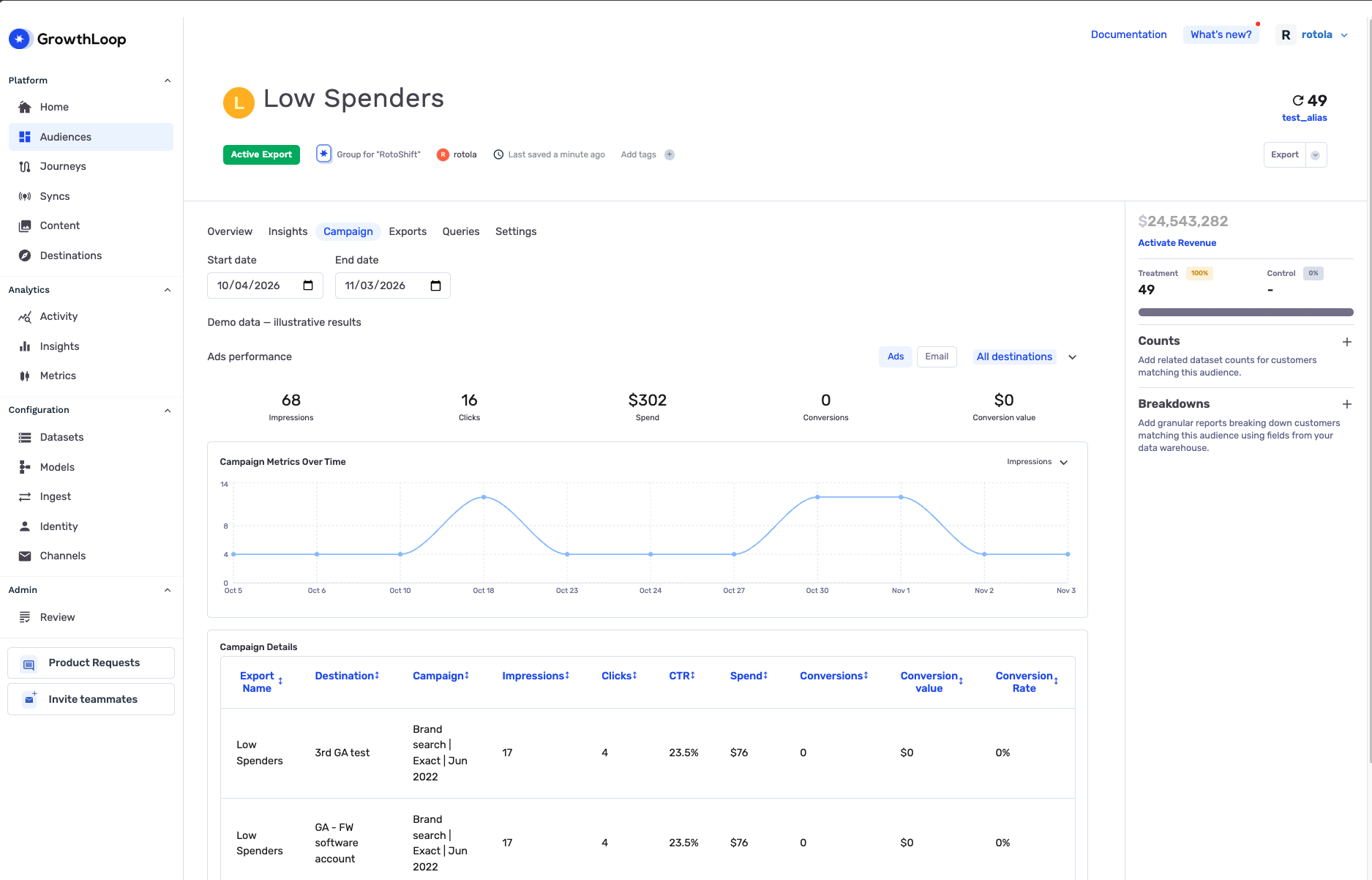
NoteDon't see the Campaign tab? Contact [email protected] to check availability and your access.
Understand the metrics
Counts and values come from the campaign reporting data available for your selected source. The report aggregates results within the selected dates and filters.
Email
| Metric | Meaning |
|---|---|
| Sends | Reported email sends |
| Opens | Reported email opens |
| Clicks | Reported email clicks |
| Unsubscribes | Reported email unsubscribes |
| Open Rate | Opens divided by sends |
| CTR | Clicks divided by sends |
| Rate | Unsubscribes divided by sends |
Ads
| Metric | Meaning |
|---|---|
| Impressions | Reported ad impressions |
| Clicks | Reported ad clicks |
| Spend | Reported campaign spend |
| Conversions | Reported campaign conversions |
| Conversion value | Reported value associated with conversions |
| CTR | Clicks divided by impressions |
| Conversion Rate | Conversions divided by clicks |
Rates appear in Campaign Details. GrowthLoop calculates each rate from the aggregated counts for that row and displays zero when the denominator is zero. These metrics do not establish whether upstream counts represent unique contacts; use your destination's reporting definitions when interpreting them.
Compare campaign results
Use Campaign Details to review Export Name, Destination, and Campaign alongside the metrics. Compare rows within the same channel and date range to identify stronger engagement or investigate changes in spend and conversions.
A campaign associated with multiple audiences can appear under more than one audience. Audience-level totals can therefore include the same campaign activity. Review the campaign associations before treating the results as distinct contributions from each audience.
You're all set! Use these results to guide your next campaign.
To review warehouse compute costs associated with GrowthLoop activity, see Billing.
Troubleshooting
These are the issues we see most often. You can always email us at [email protected] for help.
| Problem | Cause | Resolution |
|---|---|---|
| The report is locked | The organization setting, report availability, or your access does not allow the report. | Ask support to check Channel Performance enablement and your access. |
| No warehouse source connections are available | There is no warehouse source available to your account. | Ask your administrator to confirm source access. |
| No chart data appears | The selected source, channel, dates, or filters have no available reporting rows. | Check the source and date range, clear the audience and destination filters, and confirm reporting data is configured. |
| Campaign performance is unavailable | GrowthLoop could not load the report. | Try again. If the problem persists, send support the source, date range, and error message. |
Updated about 1 hour ago