
The Trade Desk Marketplace
Use provider-owned audiences for Trade Desk Data Marketplace segments.
Connect this destination to export provider-owned audience membership into The Trade Desk Data Marketplace, for use as licensable segments.
This destination writes to your Trade Desk Marketplace account and is a good fit when you want to:
- Let advertisers license and target your provider-owned audiences
- Publish segments, not conversion events
This maps to GrowthLoop Audiences:
| Use it for | Audiences |
|---|---|
| Publishing provider-owned audiences for other advertisers | ✓ |
Do not use this destination for advertiser first-party activation. If you send your own customers to your own Trade Desk seat, use The Trade Desk or The Trade Desk CRM. To send conversion events, use The Trade Desk Conversions.
Prerequisites
Make sure you have:
- An active The Trade Desk data provider account with Data Marketplace access. If you do not have one, contact The Trade Desk here.
- Your Data Provider ID and a data-provider API token. Obtain both from your Trade Desk Technical Account Manager (TAM).
- UID2 operator credentials if your audiences contain email or phone. These include a UID2 base URL, API key, and secret key. If your audiences use only native IDs (TDID, DAID, UID2, and so on), you do not need UID2 configuration.
NoteTAM-provided values sometimes include trailing whitespace. Store your Provider ID and API token without extra spaces.
Set up The Trade Desk Marketplace as a destination
- In GrowthLoop, click the Destinations tab on the left sidebar.
- Click New Destination on the upper right side.
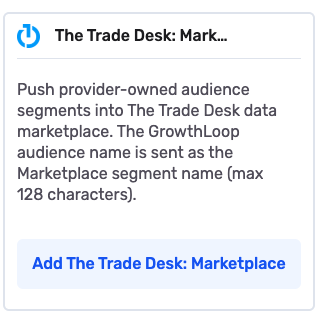
- Search for The Trade Desk: Marketplace and click Add The Trade Desk: Marketplace.
- Enter the required information, then click Create.
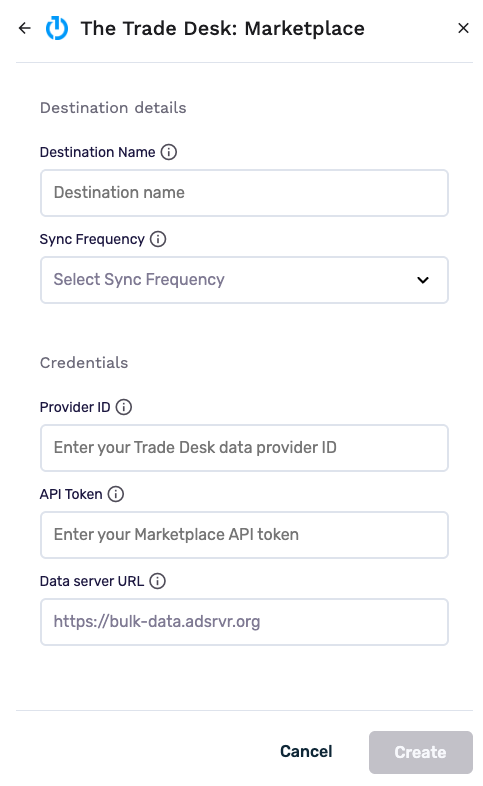
| Field | Description |
|---|---|
| Destination Name | Name this destination in GrowthLoop. Use a name so your team recognizes its purpose, like "Trade Desk Marketplace". |
| Sync Frequency | Set the default export frequency (for example, daily or weekly). You can override this setting for individual exports. |
| Provider ID | Your Trade Desk Data Provider ID. GrowthLoop scopes every upload to this ID. |
| API Token | Your data-provider Marketplace API token. GrowthLoop uses it to authenticate requests. |
| Data server URL | The Trade Desk data server base URL. Keep the default value, https://bulk-data.adsrvr.org, unless your TAM provides a different endpoint. |
GrowthLoop validates the credentials. The Trade Desk: Marketplace then appears in your list of connected destinations.
Export to The Trade Desk Marketplace
From within GrowthLoop, export from an audience. Marketplace is an audience Export only. See Export an audience if you need more information on these steps.
After building or selecting an audience, click Export, then search for The Trade Desk: Marketplace. GrowthLoop defaults the export name to the audience name. The Trade Desk uses that name as the Marketplace segment name (up to 128 characters).
Map identifiers
Under Configure Match Field Settings, map at least one supported identifier. A single record can include more than one identifier. GrowthLoop uses the first non-empty identifier on each row. GrowthLoop drops records with no recognized identifier and counts them as failed.
| Match field | Description |
|---|---|
| Email → UID2 | Email address. GrowthLoop resolves it to a raw UID2 before upload and never sends raw email to The Trade Desk |
| Phone → UID2 | Phone number. GrowthLoop resolves it to a raw UID2 before upload and never sends raw phone to The Trade Desk |
| TDID | The Trade Desk ID |
| DAID | Device advertising ID (IDFA or AAID) |
| UID2 | Raw Unified ID 2.0 |
| UID2 token | UID2 in token form |
| EUID / EUID token | European Unified ID and its token form |
| RampID | LiveRamp RampID |
| CoreID, ID5, NetID, FirstID | Additional supported partner identifiers |
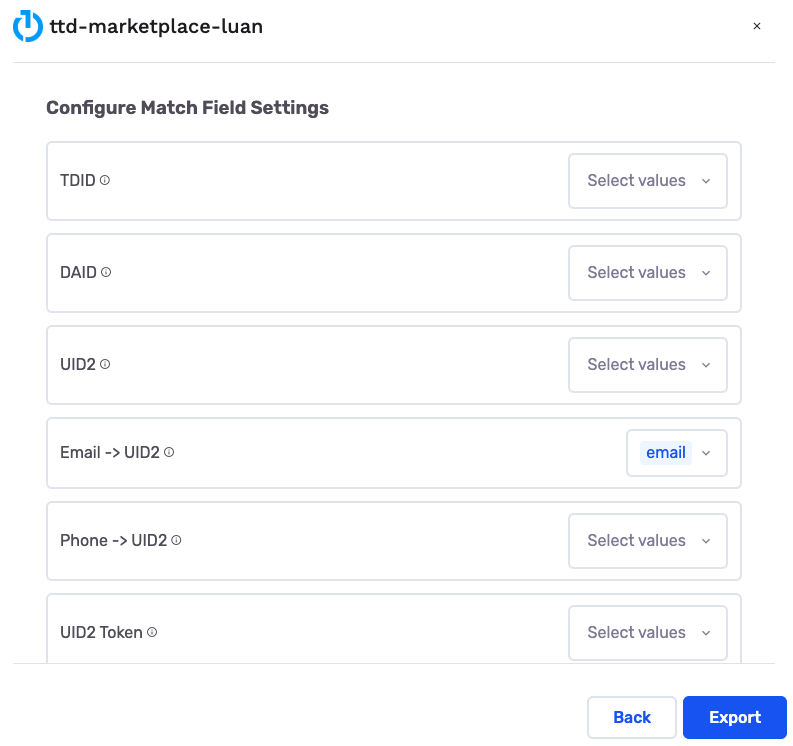
If you map Email → UID2 or Phone → UID2, configure UID2 credentials on the destination. See UID2 identifiers.
Configure the export
This is where you set the campaign type and schedule for audience exports.
- Export Name: GrowthLoop populates this with your audience name. The Trade Desk uses it as the Marketplace segment name (up to 128 characters).
- Campaign Type: Choose a one-time export or an ongoing export.
- Export Schedule: Set the frequency, start date, and end date.
Export behavior
This is what GrowthLoop writes when you export an audience.
| Behavior | What happens |
|---|---|
| What GrowthLoop writes | Provider-owned Marketplace segment membership. Direction is GrowthLoop → The Trade Desk Marketplace. |
| When it runs | GrowthLoop sends the export as a batch on the next successful run. An export that starts Now runs within about 15 minutes. |
| Segment provisioning | GrowthLoop uploads membership to The Trade Desk third-party data API. The Trade Desk provisions the Marketplace segment on the first write. |
| Membership TTL | The Trade Desk applies a 180-day TTL, its maximum for third-party data. |
| Re-exports | Re-sending an active member refreshes membership. Re-export ongoing audiences within 180 days to keep members active. |
| One-time exports | GrowthLoop sends current membership once. |
| Removals | When someone leaves the GrowthLoop audience, GrowthLoop expires their segment membership by re-sending the identity with a TTL of 0. |
| Raw PII | GrowthLoop does not send raw email or phone downstream. It resolves those values to UID2 first. |
| Privacy opt-out | Marketplace exports do not include the Trade Desk User Opt-Out & Deletion mapping available on The Trade Desk first-party exports. Expiring membership for one segment does not delete the user across The Trade Desk. |
Confirm the export was successful
When the run finishes, confirm you can use the data in The Trade Desk Marketplace.
- Audience export: Look up the Data Marketplace segment named after your GrowthLoop audience.
The Trade Desk names the segment after your GrowthLoop audience (up to 128 characters) and provisions it on the first membership write.
In GrowthLoop, review counts on the audience Exports tab. See Export an audience for more information.
Congrats on successfully exporting to The Trade Desk Marketplace!
Troubleshooting
These are the issues we see most often. You can always email us at [email protected] for help.
| Problem | Cause | Resolution |
|---|---|---|
| Connection fails to validate | The credentials are advertiser first-party or CRM keys | Enter data-provider credentials from your TAM. |
| Provider ID or token is rejected | Trailing whitespace is stored with the value | Trim trailing spaces from the Provider ID and API token. |
| Email or phone records fail | UID2 is not configured on the destination | Configure UID2 on the destination. See UID2 identifiers. |
| Members disappear after 180 days | Marketplace membership TTL expired | Re-export within 180 days. |
Updated about 2 months ago